Jimo vs. Appcues: the best SaaS adoption tool for your product
Dec 9, 2025
/
6 mins read


In todayโs hyper-competitive saas landscape, product teams face growing challenges as they try to increase adoption, keep users engaged, and defend their value inside fast-moving companies. What used to be seen as an engine of growth is now too often viewed as a cost center. Product Management must justify every decision, every strategy, and every feature release. Thatโs why modern PMs focus heavily on building a smooth, high-impact experience that guides users through every step of the onboarding process, improving saas adoption, activation, and long-term engagement.
โYou only have ten seconds to make an impression."
Today, it applies just as much to your app as it does to people.
Your onboarding is your first handshake, your first pitch, and your first promise, wrapped into a few essential features. It directly influences product adoption, customer behavior, lifetime value, churn, and loyalty. Nail it, and users immediately understand your productโs value. Miss it, and they drop off before the adoption process even begins.
Choosing the right partner for your saas product adoption is therefore not optional, itโs strategic for the present and the future of your business.
In this article, we compare Jimo and Appcues, two leading DAP, to help you evaluate which solution best fits your product, your customers, and your growth ambitions.
Book a free demo with Jimo and discover how to streamline your SaaS adoption ๐

What is Jimo, what it promises and where it excels
Jimo is a modern, AI-powered, low-code saas adoption platform built specifically to help saas companies accelerate product adoption and keep users engaged at every stage of their journey. Designed for product teams who need speed, autonomy, and flexibility, Jimo removes friction from the adoption process and empowers teams to ship high-quality experiences in minutes.
Jimo offers a complete suite of in-app features: product tours, modals, banners, checklists, surveys, feedback widgets, in-app announcements, and a fully customizable resource center. Everything is managed through one editor, ensuring that companies can maintain brand consistency, deliver contextual education, and guide users with precision.
Speed is one of Jimoโs strongest advantages. You can integrate the snippet quickly, create an onboarding flow in under two minutes, and launch features without depending on engineering. For fast-moving teams, this improvement in time-to-market can transform product adoption metrics, activation rate, and customer success outcomes.
Jimo also excels in customization. Its editor gives full control over design, targeting, and triggers, ensuring every experience looks native to your product and aligned with your brand. This level of personalization is critical for driving user adoption, increasing engagement, and showcasing the value of each feature.
What is Appcues, and what are its strengths and benefits?
Appcues is one of the most established software tools in the digital product adoption space. Its platform helps teams build onboarding flows, in-app messages, multi-step product tours, and targeted experiences without heavy engineering support. It offers segmentation, analytics, and behavioral triggers, enabling companies to orchestrate end-to-end customer journeys and measure results with reliable data.
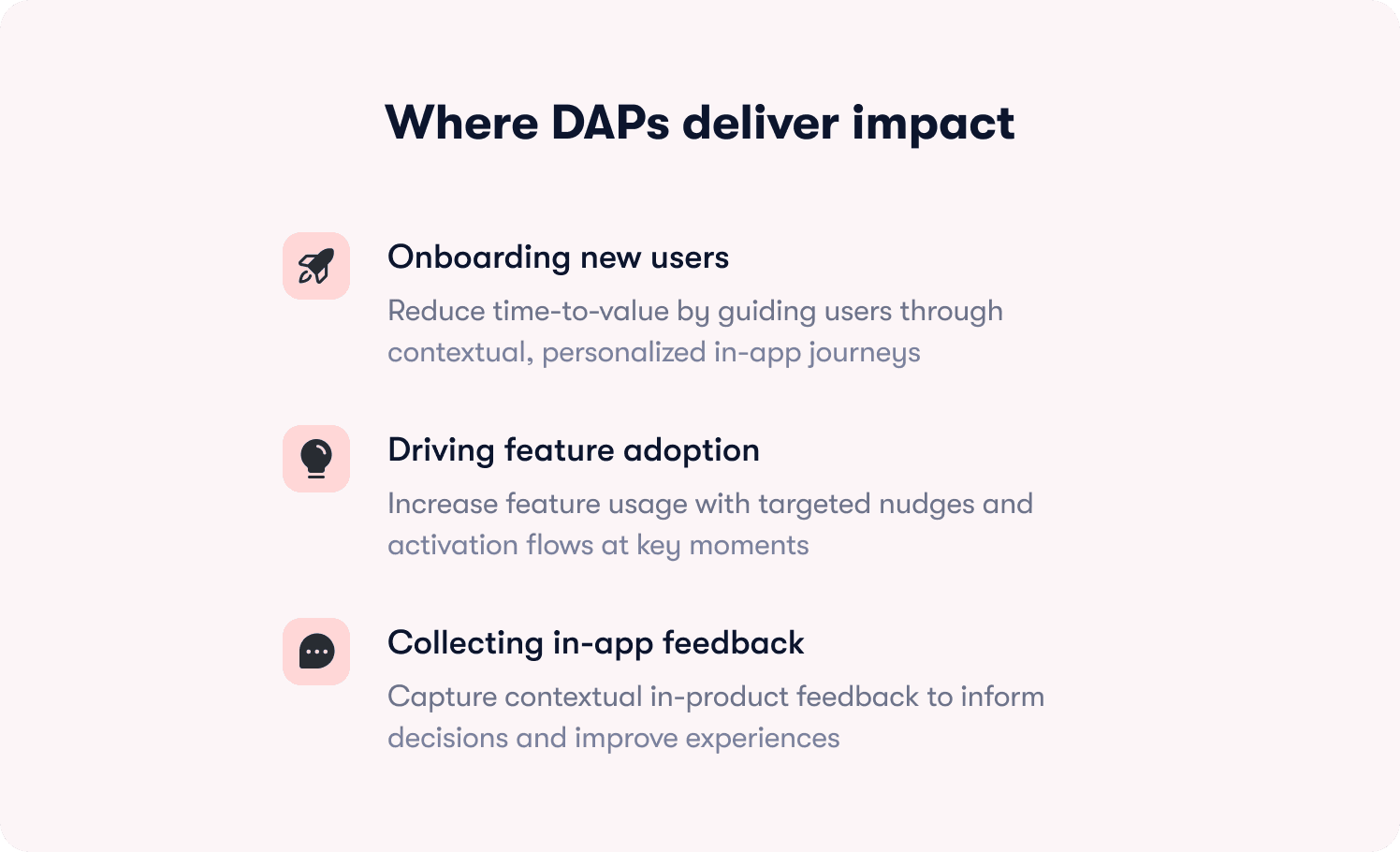
Common use cases include onboarding new product users, driving feature discovery, reducing support tickets, and improving overall engagement. Appcues can combine in-app flows with email or push messaging to reinforce adoption outside the platform, creating a more holistic workflow.
Many organizations choose Appcues for its maturity: solid templates, multi-channel orchestration, reliable analytics, and years of refinement. For companies seeking a familiar, proven approach, Appcues delivers stability at scale.
How to Choose Your SaaS Adoption Partner
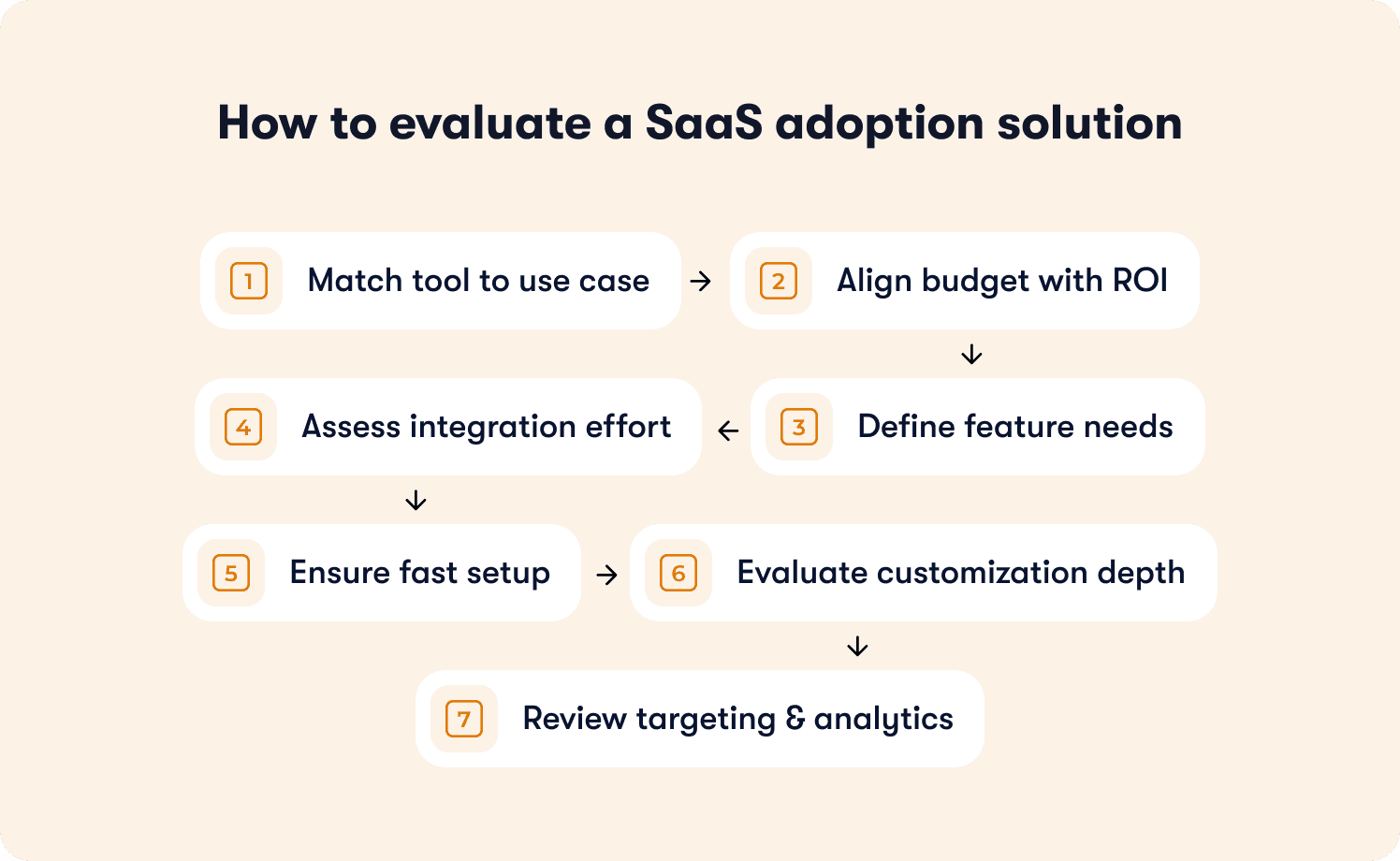
Your choice of product adoption platform will directly impact your onboarding, your customer experience, your results, and ultimately your revenue. Choosing the wrong tool can slow down your product team, limit your ability to keep users engaged, or create friction in the adoption process. The right saas adoption partner, however, strengthens your strategies, accelerates engagement, and helps you deliver meaningful value inside your app at exactly the right time. To choose wisely, product teams must evaluate several essential comparison points โ from use case to budget, from features to long-term ROI โ to ensure sustainable success and better product adoption across the entire customer journey.
1. Match the SaaS adoption tool to Your use case
Not all Digital Adoption Platforms (DAPs) are designed for the same purpose, and this is one of the most important steps in building a strong adoption strategy. Some platforms are built specifically for onboarding SaaS users into a web product, while others are optimized for employee onboarding inside internal software systems. A smaller set of tools focus on mobile app walkthroughs, helping guide users through new features and improving activation during the early stage of the experience.
Before comparing platforms, clearly define your primary use case, because it will determine the features, complexity, and workflows your product team will need:
Are you guiding customers through your SaaS product? This requires strong segmentation, contextual triggers, and flexible in-app experiences.
Are you training employees on internal software? This may require cross-application support, simpler guidance, and scalability across several systems.
Are you improving mobile app onboarding and feature adoption? Mobile-first strategies depend on lightweight components adapted to small screens and quick engagement.
Your use case influences how much customization you need, how many users must be supported, and how dynamic your in-app adoption process must be. A platform optimized for internal onboarding, for example, will struggle to deliver the same product adoption quality needed for a customer-facing saas product adoption journey. Matching the tool to your real-world context ensures your strategies are built on the right foundation.
2. Understand Your Budget and Expected ROI
Choosing a saas adoption platform isnโt just a feature comparison โ itโs a financial decision that affects the long-term success of your product and your business. DAP pricing varies widely based on company size, number of users, the breadth of features, and expected growth. Most platforms use a subscription model where pricing scales according to monthly active users, advanced analytics, or additional capabilities tied to customer behavior tracking.
Before committing, take the time to estimate:
How many users you plan to onboard and how quickly they need to reach activation.
How fast you expect to demonstrate product value during the onboarding process.
Whether the pricing model grows predictably as your product, audience, and feature set expand.
A strong adoption strategy requires clarity on ROI. The right platform should not only fit your budget today โ it should help you reduce churn, improve engagement, increase adoption rates, and enhance your overall customer experience over time. A tool that delivers measurable improvements in product adoption, helps optimize key metrics, and supports your journey toward scalable growth will create far more value than one that simply offers a lower monthly subscription.
3. Evaluate the depth of features you actually need
While both Jimo and Appcues support onboarding and product adoption, the philosophy behind their features differs significantly โ and the right choice depends heavily on your productโs complexity and your overall adoption strategy. Appcues, founded in 2013, positions itself as a mature Digital Adoption Platform built around structured, templated experiences. It focuses primarily on customer onboarding, in-app flows, NPS, personalization, and UX improvements. With wide device support and ready-made templates for tours and messaging, Appcues works well for teams looking for predictable, multi-step walkthroughs and standardized behavioral targeting.
Appcues is a strong fit if you mainly need:
Multi-step product tours and guided flows
Behavioral targeting based on predefined events
Templates that simplify onboarding setup
A traditional, structured approach to product adoption
However, Appcues becomes limited when teams require deeper flexibility, especially when the onboarding strategy goes beyond simple walkthroughs, or when components like hints, resource centers, or changelogs become essential.
Jimo, by contrast, takes a modern and highly flexible approach to experiences. Designed as both an onboarding and user research platform, Jimo offers richer contextual components at a lower price point. Unlike Appcues, it includes:
Hints and nudges
Fully built-in resource center
In-app announcements and banners
Checklists, surveys, and feedback widgets
Product tours and modals
A native changelog
Jimo also emphasizes speed, customization, and team autonomy. Product managers can design fully branded, native-feeling experiences without engineering involvement, thanks to granular control over design, targeting, and triggers. This makes Jimo ideal for products with sophisticated journeys, multiple user segments, or frequent iteration cycles.
You should consider Jimo if your product needs:
Real-time personalization
Deep customization of in-app components
Fast iteration and low engineering dependency
Multi-segment, multi-touch onboarding strategies
Engagement, feedback, onboarding combined in a single experience layer
In short, while both platforms cover onboarding fundamentals, Jimo offers the flexibility and depth needed for complex, fast-evolving product journeys, making it a stronger choice when your adoption strategy goes beyond simple tours.
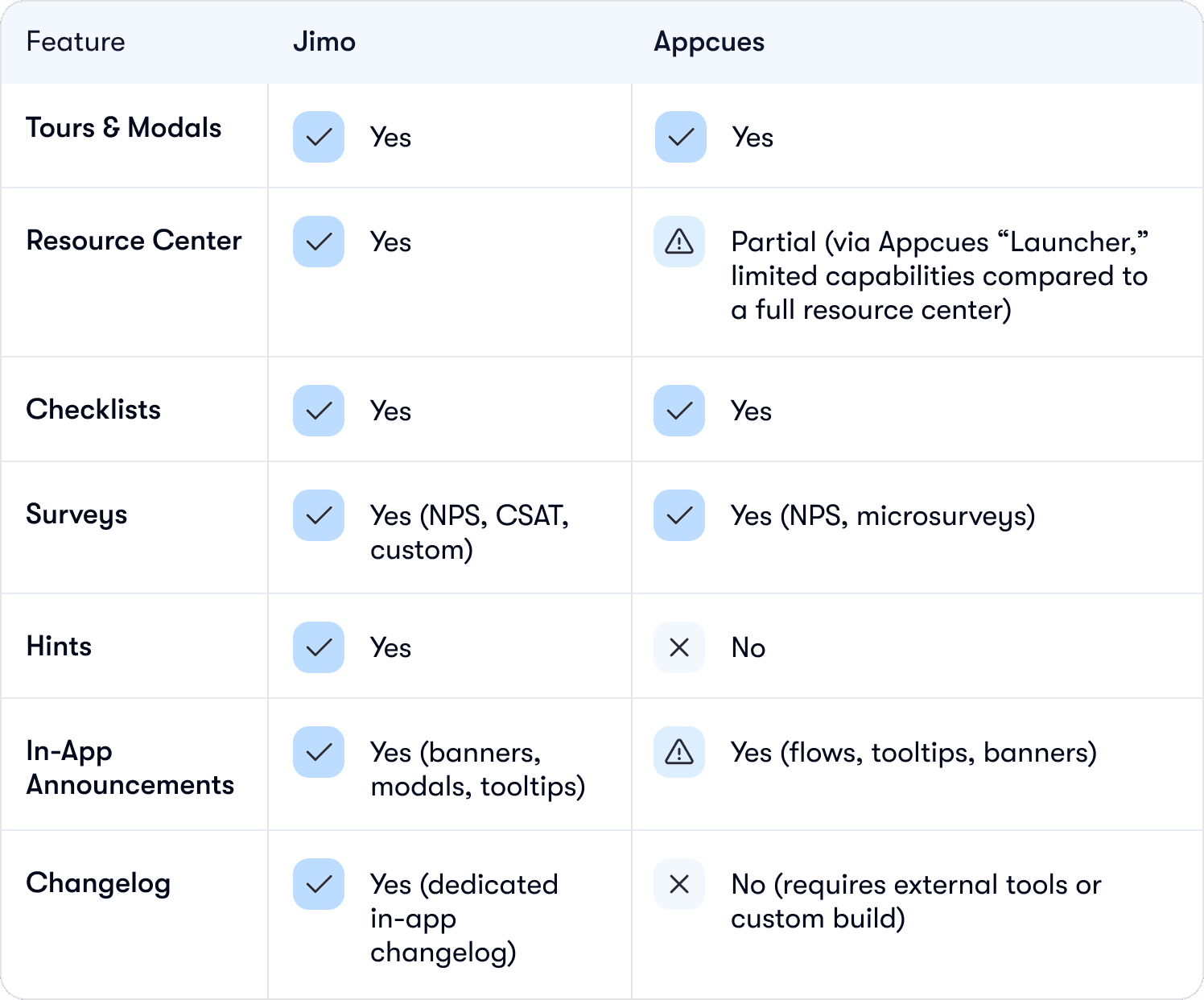
Feature | Jimo | Appcues |
|---|---|---|
Tours & Modals | โ Yes | โ Yes |
Resource Center | โ Yes | โ ๏ธ Partial (via Appcues โLauncher,โ limited capabilities compared to a full resource center) |
Checklists | โ Yes | โ Yes |
Surveys | โ Yes (NPS, CSAT, custom) | โ Yes (NPS, microsurveys) |
Hints | โ Yes | โ No |
In-App Announcements | โ Yes (banners, modals, tooltips) | โ Yes (flows, tooltips, banners) |
Changelog | โ Yes (dedicated in-app changelog) | โ No (requires external tools or custom build) |
4. Assess integration requirements and engineering effort
Integration capabilities are a critical yet often overlooked factor when choosing your SaaS adoption platform, and they play a major role in determining how quickly your product team can deliver value, improve user adoption, and scale engagement strategies over time. Every DAP integrates differently with your existing software stack, and the level of engineering work required can dramatically impact your product adoption process, your workflows, and your teamโs overall success. A strong integration model ensures that data flows smoothly across your app, your analytics tools, and your customer systems, enabling consistent experience delivery and better decisions.
When assessing a DAP, consider the following points:
Does the tool integrate with your analytics stack (Segment, Amplitude, Mixpanelโฆ)? These integrations power meaningful insights, metrics, and product analytics that help you understand user behavior and optimize your adoption strategy.
Do you need to sync customer attributes from your CRM or CDP? This helps you personalize features, guide different users based on their needs, and improve the overall saas adoption journey.
How much engineering work is required to set up events, triggers, or custom tracking? Heavy setup slows down your product team and delays activation, while a lightweight setup accelerates success.
Will your team remain autonomous after integration? The right platform keeps PMs, designers, and growth teams in control without recurring engineering dependencies.
A good SaaS adoption solution should offer seamless integrations that reduce technical friction, keep users engaged, support real-time data synchronization, and strengthen the adoption process, not increase the burden on engineering. The more fluid the integration, the easier it becomes to deliver personalized in-app journey, improve engagement, avoid churn, and drive long-term product adoption across your saas ecosystem.
5. Check ease and speed of set-up of your saas adoption tool
Your product adoption tool should empower your team, not slow them down. For any saas company, speed is a competitive advantage, and the right platform can dramatically improve the experience your users have from day one. The best solutions reduce engineering dependency, accelerate creation cycles, and shorten the time required to deliver meaningful value inside your platform. When evaluating different saas adoption platforms, itโs essential to compare how quickly each tool allows your product team to build, test, and iterate on onboarding flows and in-app features. A tool that forces constant engineering involvement will slow your process, delay activation, and make it harder to keep users engaged throughout their journey.
Look for tools that give your PMs, designers, and growth teams the autonomy they need to move fast. Consider the following:
How quickly can your team create and publish new in-app journey? Fast iteration is essential for modern product adoption.
Is the editor truly no-code, or does it require recurring engineering work? This determines whether teams can work independently or rely on developers.
Does the platform support quick modifications at any stage? Speed matters when adapting to evolving customer behavior or product updates.
How intuitive is the UI/UX of the editor? The easier it is to use, the more experiments your team can run.
Can you ship personalized content in real time? Dynamic targeting increases engagement and improves adoption rates.
How long does it take to integrate the snippet and start tracking data? A fast setup accelerates success early in the process.
Does the platform support efficient workflows for multi-segment journeys? This is crucial for advanced adoption strategies.
A fast, lightweight saas adoption platform doesnโt just make your team more efficient, it increases engagement, boosts activation, and accelerates overall product adoption. When your team can build experiences in minutes instead of days, they can react faster to customer needs, refine strategies, and deliver more value at every stage of the user journey.
Ultimately, a tool that supports rapid iteration leads to:
Higher team productivity and better internal workflows
More impactful in-app experiences for users
Faster onboarding and smoother adoption process
Lower friction and reduced dependency on engineering
Stronger long-term success across your entire saas ecosystem
In short, speed and autonomy are not just โnice to haveโ โ they are essential components of a winning product adoption strategy. Your platform should help you move faster, ship better, and deliver value to your users at exactly the right time.
Feature / Capability | Jimo | Appcues |
|---|---|---|
Set-up Ease & Speed | โก Extremely fast โ install & build within minutes | โ ๏ธ Moderate โ requires more initial configuration |
Time-to-First-Live-Experience | โฑ๏ธ Under 2 minutes | โฑ๏ธ Typically 30โ120 minutes depending on complexity |
No-Code Editor Depth | ๐ก Deep control: layout, style, triggers, variables | ๐ Good but more template-driven |
Ease of Iteration | ๐ Very easy โ instant edits, fast updates, no dev | ๐ Easy but changes may require more steps |
Developer Dependency | ๐ Very low โ PMs/designers can ship autonomously | ๐ Medium โ some setups need dev involvement |
Workflow Simplicity | ๐งฉ Streamlined: create โ preview โ publish | ๐งฉ More steps; multi-layer flow builder can be heavy |
Component Flexibility | ๐จ Flexible components fully customizable | ๐จ Good flexibility, but style constraints exist |
AI Assistance | ๐ค Yes โ AI can generate tours & steps instantly | โ No built-in AI for creation |
Preview Experience | ๐ Real-time, in-app preview | ๐ Good preview, slightly slower to update |
Multi-Page Flow Handling | ๐ Very smooth โ detects anchors automatically | โ ๏ธ Requires more configuration |
Publishing Workflow | ๐ฃ Simple, fast publishing + segmentation inline | ๐ฃ More configuration (flows, segments, events) |
Learning Curve | ๐ Very low โ intuitive for non-technical teams | ๐ Medium โ more features = more onboarding time |
6. Inspect depth of in-app experiences, customization, and experience quality
A strong saas adoption strategy relies on rich, flexible, and highly customizable features that support every key stage of the user journey. A modern product adoption tool shouldnโt stop at simple walkthroughsโit must help your product team design a complete, end-to-end experience that adapts to different users, different segments, and different moments of the adoption process. This means supporting interactive tours, actionable checklists, contextual surveys, dynamic resource centers, in-app announcements, release notes, and personalized nudges that guide customer behavior inside your application.
To choose the right saas platform, you need to evaluate how far you can customize your UX, and how easily you can tailor every step of the experience to the context, needs, and behavior of your users. Deep customization is essential: it ensures that each in-app interaction reflects your brand, matches the design system of your software, and communicates the real value of your product at the right time. The more control you have over design, targeting, and triggering rules, the easier it becomes to create meaningful engagement, reduce friction, prevent churn, and increase activation and long-term success.
When your adoption strategy is supported by flexible tools, personalized content, and real-time adaptation, your product gains a massive advantage. You can guide different users based on their journey, track key metrics, optimize workflows, and deliver the kind of tailored experience that keeps users engaged, improves adoption rates, and drives measurable growth across your entire saas ecosystem.
7. Targeting, analytics & measurement capabilities
Your saas adoption platform should help you understand far more than just what users click. It should reveal how they behave inside your product, where they succeed, where they struggle, and exactly where they drop in the adoption process. Deep visibility into user behavior is essential to improving product adoption, increasing activation, and ensuring long-term engagement across your customer journey.
A powerful platform doesn't just deliver in-app experiences; it delivers the right experience to the right user at the right time. This is where analytics, segmentation, and targeting capabilities become critical. By comparing the depth of these capabilities across different saas tools, you can quickly see which solution gives your team the data, insights, and precision needed to optimize your adoption strategy.
Hereโs what to look for when evaluating the analytics and targeting layer of any adoption tool:
Advanced analytics: Helps you understand the full journey, not just surface-level clicks.
Behavior-based segmentation: Allows PMs to tailor features, messages, and components based on real user behavior.
Event-level insights: Shows activation points, friction points, and where users drop out.
Cohort analysis: Helps you compare how different groups respond to onboarding or new features.
Real-time targeting: Ensures users see the right content the moment they need it.
Feedback loops: Connects surveys and product analytics to help refine your strategies.
Ease of integration: Ensures analytics sync smoothly with tools like Segment, Amplitude, or Mixpanel.
When segmentation is precise and analytics are reliable, your product team gains the ability to personalize application content, adapt experiences dynamically, and proactively identify challenges before they impact churn or conversion.
Good analytics lead directly to:
Better decisions based on real data
Higher adoption rates and stronger activation
Lower churn and improved retention
More efficient workflows for PMs and designers
Scalable, repeatable business growth driven by insights
In short, a strong analytics and targeting engine transforms your saas product adoption efforts from guesswork into a data-led process, reinforcing value, improving the experience, and helping your product reach its full potential.
Feature / Capability | Jimo | Appcues |
|---|---|---|
Segmentation | โ Yes โ segment by user attributes, behavior, events, metadata | โ Yes โ strong segmentation based on attributes & behavior |
Analytics | โ Built-in analytics: adoption, flow completion, engagement, dropoff | โ Built-in analytics focused on flow performance & usage |
Integrations | โ Integrates with analytics tools (Segment, Mixpanel, Amplitudeโฆ) | โ Integrates with major analytics platforms & CDPs |
Event-Based Targeting | โ Yes โ trigger experiences based on real-time events | โ ๏ธ Available but more complex to set up |
Real-Time Personalization | โ Yes โ dynamic variables & contextual personalization | โ ๏ธ Limited โ personalization mainly template-based |
Goal Tracking / Success Metrics | โ Included โ track goals tied to flows & components | โ ๏ธ Available but less granular |
A/B Testing | โ ๏ธ Roadmap / limited (depending on plan) | โ Yes โ built-in experiment framework |
Data Freshness | โก Near real-time | โก Near real-time |
Behavioral Targeting Depth | High โ event + role + attribute + page + custom variable | Medium โ strong, but fewer dynamic conditions |
Dashboard Clarity | Modern, lightweight, focused on actionability | Comprehensive but sometimes more complex/heavy |
Cross-Experience Reporting | โ Yes โ consolidated insights across banners, checklists, tours | โ ๏ธ Partial โ strongest for flows/tours only |
Installation / Tracking Setup | Very simple โ minimal dev work | Heavier โ requires configuration for deeper analytics |
Final fight: Jimo vs. Appcues, which to choose to boost your saas adoption?
If your priority is speed, autonomy, deep customization, fast value delivery, and modern onboarding capabilities, Jimo is built for you. It empowers your product team to launch better experiences, improve engagement, analyze behavior, and increase product adoption with less effort and more impact.
Appcues remains a strong platform for companies looking for a mature, template-driven solution, but Jimo offers the flexibility, speed, and innovation needed today to drive the next generation of saas product adoption.
When your goal is a seamless experience, higher activation, stronger engagement, and measurable success, Jimo is the partner that turns your product into a solution your users will rely on every day.
As a conclusion, how to compare Jimo & Appcues? Here is a table with the core differences between those two SaaS adoption tools.
Feature / Dimension | Appcues | Jimo |
|---|---|---|
Core Functionality | In-app onboarding, user flows, multi-step tours, modals/tooltips, segmentation & behavioral triggers, analytics, email & push workflows. (Appcues) | In-app onboarding and user guidance: product tours, modals, banners, checklists, surveys/feedback, resource center โ all in one low-/no-code toolkit. (Jimo Help Center) |
Setup / Time to Launch | Designed for no-/low-code onboarding; established tool with workflows & templates โ but depending on complexity/setup, may require some time. (Appcues) | Very fast setup โ claims โ2 mins to create onboarding, not hours.โ (Jimo) |
Customization & UI / Branding Flexibility | Offers segmentation, behavioral triggers, workflows, but UI customization may be more constrained, as itโs a more general tool. (Jimo) | Flexible editor: design, triggering, targeting are customizable โ enabling UI/UX consistency with product UI, more control over look & feel. (Jimo) |
Scope of In-App Tools / Feature Set | Onboarding flows, tooltips/modals, segmentation, triggers, analytics, email/push workflows, user tours. (Appcues) | More โall-in-oneโ โ besides tours and onboarding: banners, checklists, surveys/feedback, resource center โ more varied UI/user-engagement elements. (Jimo Help Center) |
Ideal Team / Use Case | Teams needing robust onboarding flows + multi-channel workflows + segmentation + analytics; companies that want stability & proven solution. (Appcues) | Teams wanting speed, flexibility, no-/low-code setup; small/medium SaaS; products needing a unified, customizable in-app experience without heavy dev overhead. (Product Hunt) |
Trade-offs / Limitations (potential) | Might be heavier for simple use cases; possibly overkill for small teams; UI customization or rapid iterations may be slower. (inferred from complexity) | As a newer/less established tool, may have fewer legacy integrations; risk/reliability less proven; depending on scale โ you may need to validate performance & support. (common with newer tools) |
Ready to discover everything Jimo can do for your SaaS adoption? Book a demo with one of our expert just here ๐

In todayโs hyper-competitive saas landscape, product teams face growing challenges as they try to increase adoption, keep users engaged, and defend their value inside fast-moving companies. What used to be seen as an engine of growth is now too often viewed as a cost center. Product Management must justify every decision, every strategy, and every feature release. Thatโs why modern PMs focus heavily on building a smooth, high-impact experience that guides users through every step of the onboarding process, improving saas adoption, activation, and long-term engagement.
โYou only have ten seconds to make an impression."
Today, it applies just as much to your app as it does to people.
Your onboarding is your first handshake, your first pitch, and your first promise, wrapped into a few essential features. It directly influences product adoption, customer behavior, lifetime value, churn, and loyalty. Nail it, and users immediately understand your productโs value. Miss it, and they drop off before the adoption process even begins.
Choosing the right partner for your saas product adoption is therefore not optional, itโs strategic for the present and the future of your business.
In this article, we compare Jimo and Appcues, two leading DAP, to help you evaluate which solution best fits your product, your customers, and your growth ambitions.
Book a free demo with Jimo and discover how to streamline your SaaS adoption ๐

What is Jimo, what it promises and where it excels
Jimo is a modern, AI-powered, low-code saas adoption platform built specifically to help saas companies accelerate product adoption and keep users engaged at every stage of their journey. Designed for product teams who need speed, autonomy, and flexibility, Jimo removes friction from the adoption process and empowers teams to ship high-quality experiences in minutes.
Jimo offers a complete suite of in-app features: product tours, modals, banners, checklists, surveys, feedback widgets, in-app announcements, and a fully customizable resource center. Everything is managed through one editor, ensuring that companies can maintain brand consistency, deliver contextual education, and guide users with precision.
Speed is one of Jimoโs strongest advantages. You can integrate the snippet quickly, create an onboarding flow in under two minutes, and launch features without depending on engineering. For fast-moving teams, this improvement in time-to-market can transform product adoption metrics, activation rate, and customer success outcomes.
Jimo also excels in customization. Its editor gives full control over design, targeting, and triggers, ensuring every experience looks native to your product and aligned with your brand. This level of personalization is critical for driving user adoption, increasing engagement, and showcasing the value of each feature.
What is Appcues, and what are its strengths and benefits?
Appcues is one of the most established software tools in the digital product adoption space. Its platform helps teams build onboarding flows, in-app messages, multi-step product tours, and targeted experiences without heavy engineering support. It offers segmentation, analytics, and behavioral triggers, enabling companies to orchestrate end-to-end customer journeys and measure results with reliable data.
Common use cases include onboarding new product users, driving feature discovery, reducing support tickets, and improving overall engagement. Appcues can combine in-app flows with email or push messaging to reinforce adoption outside the platform, creating a more holistic workflow.
Many organizations choose Appcues for its maturity: solid templates, multi-channel orchestration, reliable analytics, and years of refinement. For companies seeking a familiar, proven approach, Appcues delivers stability at scale.
How to Choose Your SaaS Adoption Partner
Your choice of product adoption platform will directly impact your onboarding, your customer experience, your results, and ultimately your revenue. Choosing the wrong tool can slow down your product team, limit your ability to keep users engaged, or create friction in the adoption process. The right saas adoption partner, however, strengthens your strategies, accelerates engagement, and helps you deliver meaningful value inside your app at exactly the right time. To choose wisely, product teams must evaluate several essential comparison points โ from use case to budget, from features to long-term ROI โ to ensure sustainable success and better product adoption across the entire customer journey.
1. Match the SaaS adoption tool to Your use case
Not all Digital Adoption Platforms (DAPs) are designed for the same purpose, and this is one of the most important steps in building a strong adoption strategy. Some platforms are built specifically for onboarding SaaS users into a web product, while others are optimized for employee onboarding inside internal software systems. A smaller set of tools focus on mobile app walkthroughs, helping guide users through new features and improving activation during the early stage of the experience.
Before comparing platforms, clearly define your primary use case, because it will determine the features, complexity, and workflows your product team will need:
Are you guiding customers through your SaaS product? This requires strong segmentation, contextual triggers, and flexible in-app experiences.
Are you training employees on internal software? This may require cross-application support, simpler guidance, and scalability across several systems.
Are you improving mobile app onboarding and feature adoption? Mobile-first strategies depend on lightweight components adapted to small screens and quick engagement.
Your use case influences how much customization you need, how many users must be supported, and how dynamic your in-app adoption process must be. A platform optimized for internal onboarding, for example, will struggle to deliver the same product adoption quality needed for a customer-facing saas product adoption journey. Matching the tool to your real-world context ensures your strategies are built on the right foundation.
2. Understand Your Budget and Expected ROI
Choosing a saas adoption platform isnโt just a feature comparison โ itโs a financial decision that affects the long-term success of your product and your business. DAP pricing varies widely based on company size, number of users, the breadth of features, and expected growth. Most platforms use a subscription model where pricing scales according to monthly active users, advanced analytics, or additional capabilities tied to customer behavior tracking.
Before committing, take the time to estimate:
How many users you plan to onboard and how quickly they need to reach activation.
How fast you expect to demonstrate product value during the onboarding process.
Whether the pricing model grows predictably as your product, audience, and feature set expand.
A strong adoption strategy requires clarity on ROI. The right platform should not only fit your budget today โ it should help you reduce churn, improve engagement, increase adoption rates, and enhance your overall customer experience over time. A tool that delivers measurable improvements in product adoption, helps optimize key metrics, and supports your journey toward scalable growth will create far more value than one that simply offers a lower monthly subscription.
3. Evaluate the depth of features you actually need
While both Jimo and Appcues support onboarding and product adoption, the philosophy behind their features differs significantly โ and the right choice depends heavily on your productโs complexity and your overall adoption strategy. Appcues, founded in 2013, positions itself as a mature Digital Adoption Platform built around structured, templated experiences. It focuses primarily on customer onboarding, in-app flows, NPS, personalization, and UX improvements. With wide device support and ready-made templates for tours and messaging, Appcues works well for teams looking for predictable, multi-step walkthroughs and standardized behavioral targeting.
Appcues is a strong fit if you mainly need:
Multi-step product tours and guided flows
Behavioral targeting based on predefined events
Templates that simplify onboarding setup
A traditional, structured approach to product adoption
However, Appcues becomes limited when teams require deeper flexibility, especially when the onboarding strategy goes beyond simple walkthroughs, or when components like hints, resource centers, or changelogs become essential.
Jimo, by contrast, takes a modern and highly flexible approach to experiences. Designed as both an onboarding and user research platform, Jimo offers richer contextual components at a lower price point. Unlike Appcues, it includes:
Hints and nudges
Fully built-in resource center
In-app announcements and banners
Checklists, surveys, and feedback widgets
Product tours and modals
A native changelog
Jimo also emphasizes speed, customization, and team autonomy. Product managers can design fully branded, native-feeling experiences without engineering involvement, thanks to granular control over design, targeting, and triggers. This makes Jimo ideal for products with sophisticated journeys, multiple user segments, or frequent iteration cycles.
You should consider Jimo if your product needs:
Real-time personalization
Deep customization of in-app components
Fast iteration and low engineering dependency
Multi-segment, multi-touch onboarding strategies
Engagement, feedback, onboarding combined in a single experience layer
In short, while both platforms cover onboarding fundamentals, Jimo offers the flexibility and depth needed for complex, fast-evolving product journeys, making it a stronger choice when your adoption strategy goes beyond simple tours.
Feature | Jimo | Appcues |
|---|---|---|
Tours & Modals | โ Yes | โ Yes |
Resource Center | โ Yes | โ ๏ธ Partial (via Appcues โLauncher,โ limited capabilities compared to a full resource center) |
Checklists | โ Yes | โ Yes |
Surveys | โ Yes (NPS, CSAT, custom) | โ Yes (NPS, microsurveys) |
Hints | โ Yes | โ No |
In-App Announcements | โ Yes (banners, modals, tooltips) | โ Yes (flows, tooltips, banners) |
Changelog | โ Yes (dedicated in-app changelog) | โ No (requires external tools or custom build) |
4. Assess integration requirements and engineering effort
Integration capabilities are a critical yet often overlooked factor when choosing your SaaS adoption platform, and they play a major role in determining how quickly your product team can deliver value, improve user adoption, and scale engagement strategies over time. Every DAP integrates differently with your existing software stack, and the level of engineering work required can dramatically impact your product adoption process, your workflows, and your teamโs overall success. A strong integration model ensures that data flows smoothly across your app, your analytics tools, and your customer systems, enabling consistent experience delivery and better decisions.
When assessing a DAP, consider the following points:
Does the tool integrate with your analytics stack (Segment, Amplitude, Mixpanelโฆ)? These integrations power meaningful insights, metrics, and product analytics that help you understand user behavior and optimize your adoption strategy.
Do you need to sync customer attributes from your CRM or CDP? This helps you personalize features, guide different users based on their needs, and improve the overall saas adoption journey.
How much engineering work is required to set up events, triggers, or custom tracking? Heavy setup slows down your product team and delays activation, while a lightweight setup accelerates success.
Will your team remain autonomous after integration? The right platform keeps PMs, designers, and growth teams in control without recurring engineering dependencies.
A good SaaS adoption solution should offer seamless integrations that reduce technical friction, keep users engaged, support real-time data synchronization, and strengthen the adoption process, not increase the burden on engineering. The more fluid the integration, the easier it becomes to deliver personalized in-app journey, improve engagement, avoid churn, and drive long-term product adoption across your saas ecosystem.
5. Check ease and speed of set-up of your saas adoption tool
Your product adoption tool should empower your team, not slow them down. For any saas company, speed is a competitive advantage, and the right platform can dramatically improve the experience your users have from day one. The best solutions reduce engineering dependency, accelerate creation cycles, and shorten the time required to deliver meaningful value inside your platform. When evaluating different saas adoption platforms, itโs essential to compare how quickly each tool allows your product team to build, test, and iterate on onboarding flows and in-app features. A tool that forces constant engineering involvement will slow your process, delay activation, and make it harder to keep users engaged throughout their journey.
Look for tools that give your PMs, designers, and growth teams the autonomy they need to move fast. Consider the following:
How quickly can your team create and publish new in-app journey? Fast iteration is essential for modern product adoption.
Is the editor truly no-code, or does it require recurring engineering work? This determines whether teams can work independently or rely on developers.
Does the platform support quick modifications at any stage? Speed matters when adapting to evolving customer behavior or product updates.
How intuitive is the UI/UX of the editor? The easier it is to use, the more experiments your team can run.
Can you ship personalized content in real time? Dynamic targeting increases engagement and improves adoption rates.
How long does it take to integrate the snippet and start tracking data? A fast setup accelerates success early in the process.
Does the platform support efficient workflows for multi-segment journeys? This is crucial for advanced adoption strategies.
A fast, lightweight saas adoption platform doesnโt just make your team more efficient, it increases engagement, boosts activation, and accelerates overall product adoption. When your team can build experiences in minutes instead of days, they can react faster to customer needs, refine strategies, and deliver more value at every stage of the user journey.
Ultimately, a tool that supports rapid iteration leads to:
Higher team productivity and better internal workflows
More impactful in-app experiences for users
Faster onboarding and smoother adoption process
Lower friction and reduced dependency on engineering
Stronger long-term success across your entire saas ecosystem
In short, speed and autonomy are not just โnice to haveโ โ they are essential components of a winning product adoption strategy. Your platform should help you move faster, ship better, and deliver value to your users at exactly the right time.
Feature / Capability | Jimo | Appcues |
|---|---|---|
Set-up Ease & Speed | โก Extremely fast โ install & build within minutes | โ ๏ธ Moderate โ requires more initial configuration |
Time-to-First-Live-Experience | โฑ๏ธ Under 2 minutes | โฑ๏ธ Typically 30โ120 minutes depending on complexity |
No-Code Editor Depth | ๐ก Deep control: layout, style, triggers, variables | ๐ Good but more template-driven |
Ease of Iteration | ๐ Very easy โ instant edits, fast updates, no dev | ๐ Easy but changes may require more steps |
Developer Dependency | ๐ Very low โ PMs/designers can ship autonomously | ๐ Medium โ some setups need dev involvement |
Workflow Simplicity | ๐งฉ Streamlined: create โ preview โ publish | ๐งฉ More steps; multi-layer flow builder can be heavy |
Component Flexibility | ๐จ Flexible components fully customizable | ๐จ Good flexibility, but style constraints exist |
AI Assistance | ๐ค Yes โ AI can generate tours & steps instantly | โ No built-in AI for creation |
Preview Experience | ๐ Real-time, in-app preview | ๐ Good preview, slightly slower to update |
Multi-Page Flow Handling | ๐ Very smooth โ detects anchors automatically | โ ๏ธ Requires more configuration |
Publishing Workflow | ๐ฃ Simple, fast publishing + segmentation inline | ๐ฃ More configuration (flows, segments, events) |
Learning Curve | ๐ Very low โ intuitive for non-technical teams | ๐ Medium โ more features = more onboarding time |
6. Inspect depth of in-app experiences, customization, and experience quality
A strong saas adoption strategy relies on rich, flexible, and highly customizable features that support every key stage of the user journey. A modern product adoption tool shouldnโt stop at simple walkthroughsโit must help your product team design a complete, end-to-end experience that adapts to different users, different segments, and different moments of the adoption process. This means supporting interactive tours, actionable checklists, contextual surveys, dynamic resource centers, in-app announcements, release notes, and personalized nudges that guide customer behavior inside your application.
To choose the right saas platform, you need to evaluate how far you can customize your UX, and how easily you can tailor every step of the experience to the context, needs, and behavior of your users. Deep customization is essential: it ensures that each in-app interaction reflects your brand, matches the design system of your software, and communicates the real value of your product at the right time. The more control you have over design, targeting, and triggering rules, the easier it becomes to create meaningful engagement, reduce friction, prevent churn, and increase activation and long-term success.
When your adoption strategy is supported by flexible tools, personalized content, and real-time adaptation, your product gains a massive advantage. You can guide different users based on their journey, track key metrics, optimize workflows, and deliver the kind of tailored experience that keeps users engaged, improves adoption rates, and drives measurable growth across your entire saas ecosystem.
7. Targeting, analytics & measurement capabilities
Your saas adoption platform should help you understand far more than just what users click. It should reveal how they behave inside your product, where they succeed, where they struggle, and exactly where they drop in the adoption process. Deep visibility into user behavior is essential to improving product adoption, increasing activation, and ensuring long-term engagement across your customer journey.
A powerful platform doesn't just deliver in-app experiences; it delivers the right experience to the right user at the right time. This is where analytics, segmentation, and targeting capabilities become critical. By comparing the depth of these capabilities across different saas tools, you can quickly see which solution gives your team the data, insights, and precision needed to optimize your adoption strategy.
Hereโs what to look for when evaluating the analytics and targeting layer of any adoption tool:
Advanced analytics: Helps you understand the full journey, not just surface-level clicks.
Behavior-based segmentation: Allows PMs to tailor features, messages, and components based on real user behavior.
Event-level insights: Shows activation points, friction points, and where users drop out.
Cohort analysis: Helps you compare how different groups respond to onboarding or new features.
Real-time targeting: Ensures users see the right content the moment they need it.
Feedback loops: Connects surveys and product analytics to help refine your strategies.
Ease of integration: Ensures analytics sync smoothly with tools like Segment, Amplitude, or Mixpanel.
When segmentation is precise and analytics are reliable, your product team gains the ability to personalize application content, adapt experiences dynamically, and proactively identify challenges before they impact churn or conversion.
Good analytics lead directly to:
Better decisions based on real data
Higher adoption rates and stronger activation
Lower churn and improved retention
More efficient workflows for PMs and designers
Scalable, repeatable business growth driven by insights
In short, a strong analytics and targeting engine transforms your saas product adoption efforts from guesswork into a data-led process, reinforcing value, improving the experience, and helping your product reach its full potential.
Feature / Capability | Jimo | Appcues |
|---|---|---|
Segmentation | โ Yes โ segment by user attributes, behavior, events, metadata | โ Yes โ strong segmentation based on attributes & behavior |
Analytics | โ Built-in analytics: adoption, flow completion, engagement, dropoff | โ Built-in analytics focused on flow performance & usage |
Integrations | โ Integrates with analytics tools (Segment, Mixpanel, Amplitudeโฆ) | โ Integrates with major analytics platforms & CDPs |
Event-Based Targeting | โ Yes โ trigger experiences based on real-time events | โ ๏ธ Available but more complex to set up |
Real-Time Personalization | โ Yes โ dynamic variables & contextual personalization | โ ๏ธ Limited โ personalization mainly template-based |
Goal Tracking / Success Metrics | โ Included โ track goals tied to flows & components | โ ๏ธ Available but less granular |
A/B Testing | โ ๏ธ Roadmap / limited (depending on plan) | โ Yes โ built-in experiment framework |
Data Freshness | โก Near real-time | โก Near real-time |
Behavioral Targeting Depth | High โ event + role + attribute + page + custom variable | Medium โ strong, but fewer dynamic conditions |
Dashboard Clarity | Modern, lightweight, focused on actionability | Comprehensive but sometimes more complex/heavy |
Cross-Experience Reporting | โ Yes โ consolidated insights across banners, checklists, tours | โ ๏ธ Partial โ strongest for flows/tours only |
Installation / Tracking Setup | Very simple โ minimal dev work | Heavier โ requires configuration for deeper analytics |
Final fight: Jimo vs. Appcues, which to choose to boost your saas adoption?
If your priority is speed, autonomy, deep customization, fast value delivery, and modern onboarding capabilities, Jimo is built for you. It empowers your product team to launch better experiences, improve engagement, analyze behavior, and increase product adoption with less effort and more impact.
Appcues remains a strong platform for companies looking for a mature, template-driven solution, but Jimo offers the flexibility, speed, and innovation needed today to drive the next generation of saas product adoption.
When your goal is a seamless experience, higher activation, stronger engagement, and measurable success, Jimo is the partner that turns your product into a solution your users will rely on every day.
As a conclusion, how to compare Jimo & Appcues? Here is a table with the core differences between those two SaaS adoption tools.
Feature / Dimension | Appcues | Jimo |
|---|---|---|
Core Functionality | In-app onboarding, user flows, multi-step tours, modals/tooltips, segmentation & behavioral triggers, analytics, email & push workflows. (Appcues) | In-app onboarding and user guidance: product tours, modals, banners, checklists, surveys/feedback, resource center โ all in one low-/no-code toolkit. (Jimo Help Center) |
Setup / Time to Launch | Designed for no-/low-code onboarding; established tool with workflows & templates โ but depending on complexity/setup, may require some time. (Appcues) | Very fast setup โ claims โ2 mins to create onboarding, not hours.โ (Jimo) |
Customization & UI / Branding Flexibility | Offers segmentation, behavioral triggers, workflows, but UI customization may be more constrained, as itโs a more general tool. (Jimo) | Flexible editor: design, triggering, targeting are customizable โ enabling UI/UX consistency with product UI, more control over look & feel. (Jimo) |
Scope of In-App Tools / Feature Set | Onboarding flows, tooltips/modals, segmentation, triggers, analytics, email/push workflows, user tours. (Appcues) | More โall-in-oneโ โ besides tours and onboarding: banners, checklists, surveys/feedback, resource center โ more varied UI/user-engagement elements. (Jimo Help Center) |
Ideal Team / Use Case | Teams needing robust onboarding flows + multi-channel workflows + segmentation + analytics; companies that want stability & proven solution. (Appcues) | Teams wanting speed, flexibility, no-/low-code setup; small/medium SaaS; products needing a unified, customizable in-app experience without heavy dev overhead. (Product Hunt) |
Trade-offs / Limitations (potential) | Might be heavier for simple use cases; possibly overkill for small teams; UI customization or rapid iterations may be slower. (inferred from complexity) | As a newer/less established tool, may have fewer legacy integrations; risk/reliability less proven; depending on scale โ you may need to validate performance & support. (common with newer tools) |
Ready to discover everything Jimo can do for your SaaS adoption? Book a demo with one of our expert just here ๐

In todayโs hyper-competitive saas landscape, product teams face growing challenges as they try to increase adoption, keep users engaged, and defend their value inside fast-moving companies. What used to be seen as an engine of growth is now too often viewed as a cost center. Product Management must justify every decision, every strategy, and every feature release. Thatโs why modern PMs focus heavily on building a smooth, high-impact experience that guides users through every step of the onboarding process, improving saas adoption, activation, and long-term engagement.
โYou only have ten seconds to make an impression."
Today, it applies just as much to your app as it does to people.
Your onboarding is your first handshake, your first pitch, and your first promise, wrapped into a few essential features. It directly influences product adoption, customer behavior, lifetime value, churn, and loyalty. Nail it, and users immediately understand your productโs value. Miss it, and they drop off before the adoption process even begins.
Choosing the right partner for your saas product adoption is therefore not optional, itโs strategic for the present and the future of your business.
In this article, we compare Jimo and Appcues, two leading DAP, to help you evaluate which solution best fits your product, your customers, and your growth ambitions.
Book a free demo with Jimo and discover how to streamline your SaaS adoption ๐

What is Jimo, what it promises and where it excels
Jimo is a modern, AI-powered, low-code saas adoption platform built specifically to help saas companies accelerate product adoption and keep users engaged at every stage of their journey. Designed for product teams who need speed, autonomy, and flexibility, Jimo removes friction from the adoption process and empowers teams to ship high-quality experiences in minutes.
Jimo offers a complete suite of in-app features: product tours, modals, banners, checklists, surveys, feedback widgets, in-app announcements, and a fully customizable resource center. Everything is managed through one editor, ensuring that companies can maintain brand consistency, deliver contextual education, and guide users with precision.
Speed is one of Jimoโs strongest advantages. You can integrate the snippet quickly, create an onboarding flow in under two minutes, and launch features without depending on engineering. For fast-moving teams, this improvement in time-to-market can transform product adoption metrics, activation rate, and customer success outcomes.
Jimo also excels in customization. Its editor gives full control over design, targeting, and triggers, ensuring every experience looks native to your product and aligned with your brand. This level of personalization is critical for driving user adoption, increasing engagement, and showcasing the value of each feature.
What is Appcues, and what are its strengths and benefits?
Appcues is one of the most established software tools in the digital product adoption space. Its platform helps teams build onboarding flows, in-app messages, multi-step product tours, and targeted experiences without heavy engineering support. It offers segmentation, analytics, and behavioral triggers, enabling companies to orchestrate end-to-end customer journeys and measure results with reliable data.
Common use cases include onboarding new product users, driving feature discovery, reducing support tickets, and improving overall engagement. Appcues can combine in-app flows with email or push messaging to reinforce adoption outside the platform, creating a more holistic workflow.
Many organizations choose Appcues for its maturity: solid templates, multi-channel orchestration, reliable analytics, and years of refinement. For companies seeking a familiar, proven approach, Appcues delivers stability at scale.
How to Choose Your SaaS Adoption Partner
Your choice of product adoption platform will directly impact your onboarding, your customer experience, your results, and ultimately your revenue. Choosing the wrong tool can slow down your product team, limit your ability to keep users engaged, or create friction in the adoption process. The right saas adoption partner, however, strengthens your strategies, accelerates engagement, and helps you deliver meaningful value inside your app at exactly the right time. To choose wisely, product teams must evaluate several essential comparison points โ from use case to budget, from features to long-term ROI โ to ensure sustainable success and better product adoption across the entire customer journey.
1. Match the SaaS adoption tool to Your use case
Not all Digital Adoption Platforms (DAPs) are designed for the same purpose, and this is one of the most important steps in building a strong adoption strategy. Some platforms are built specifically for onboarding SaaS users into a web product, while others are optimized for employee onboarding inside internal software systems. A smaller set of tools focus on mobile app walkthroughs, helping guide users through new features and improving activation during the early stage of the experience.
Before comparing platforms, clearly define your primary use case, because it will determine the features, complexity, and workflows your product team will need:
Are you guiding customers through your SaaS product? This requires strong segmentation, contextual triggers, and flexible in-app experiences.
Are you training employees on internal software? This may require cross-application support, simpler guidance, and scalability across several systems.
Are you improving mobile app onboarding and feature adoption? Mobile-first strategies depend on lightweight components adapted to small screens and quick engagement.
Your use case influences how much customization you need, how many users must be supported, and how dynamic your in-app adoption process must be. A platform optimized for internal onboarding, for example, will struggle to deliver the same product adoption quality needed for a customer-facing saas product adoption journey. Matching the tool to your real-world context ensures your strategies are built on the right foundation.
2. Understand Your Budget and Expected ROI
Choosing a saas adoption platform isnโt just a feature comparison โ itโs a financial decision that affects the long-term success of your product and your business. DAP pricing varies widely based on company size, number of users, the breadth of features, and expected growth. Most platforms use a subscription model where pricing scales according to monthly active users, advanced analytics, or additional capabilities tied to customer behavior tracking.
Before committing, take the time to estimate:
How many users you plan to onboard and how quickly they need to reach activation.
How fast you expect to demonstrate product value during the onboarding process.
Whether the pricing model grows predictably as your product, audience, and feature set expand.
A strong adoption strategy requires clarity on ROI. The right platform should not only fit your budget today โ it should help you reduce churn, improve engagement, increase adoption rates, and enhance your overall customer experience over time. A tool that delivers measurable improvements in product adoption, helps optimize key metrics, and supports your journey toward scalable growth will create far more value than one that simply offers a lower monthly subscription.
3. Evaluate the depth of features you actually need
While both Jimo and Appcues support onboarding and product adoption, the philosophy behind their features differs significantly โ and the right choice depends heavily on your productโs complexity and your overall adoption strategy. Appcues, founded in 2013, positions itself as a mature Digital Adoption Platform built around structured, templated experiences. It focuses primarily on customer onboarding, in-app flows, NPS, personalization, and UX improvements. With wide device support and ready-made templates for tours and messaging, Appcues works well for teams looking for predictable, multi-step walkthroughs and standardized behavioral targeting.
Appcues is a strong fit if you mainly need:
Multi-step product tours and guided flows
Behavioral targeting based on predefined events
Templates that simplify onboarding setup
A traditional, structured approach to product adoption
However, Appcues becomes limited when teams require deeper flexibility, especially when the onboarding strategy goes beyond simple walkthroughs, or when components like hints, resource centers, or changelogs become essential.
Jimo, by contrast, takes a modern and highly flexible approach to experiences. Designed as both an onboarding and user research platform, Jimo offers richer contextual components at a lower price point. Unlike Appcues, it includes:
Hints and nudges
Fully built-in resource center
In-app announcements and banners
Checklists, surveys, and feedback widgets
Product tours and modals
A native changelog
Jimo also emphasizes speed, customization, and team autonomy. Product managers can design fully branded, native-feeling experiences without engineering involvement, thanks to granular control over design, targeting, and triggers. This makes Jimo ideal for products with sophisticated journeys, multiple user segments, or frequent iteration cycles.
You should consider Jimo if your product needs:
Real-time personalization
Deep customization of in-app components
Fast iteration and low engineering dependency
Multi-segment, multi-touch onboarding strategies
Engagement, feedback, onboarding combined in a single experience layer
In short, while both platforms cover onboarding fundamentals, Jimo offers the flexibility and depth needed for complex, fast-evolving product journeys, making it a stronger choice when your adoption strategy goes beyond simple tours.
Feature | Jimo | Appcues |
|---|---|---|
Tours & Modals | โ Yes | โ Yes |
Resource Center | โ Yes | โ ๏ธ Partial (via Appcues โLauncher,โ limited capabilities compared to a full resource center) |
Checklists | โ Yes | โ Yes |
Surveys | โ Yes (NPS, CSAT, custom) | โ Yes (NPS, microsurveys) |
Hints | โ Yes | โ No |
In-App Announcements | โ Yes (banners, modals, tooltips) | โ Yes (flows, tooltips, banners) |
Changelog | โ Yes (dedicated in-app changelog) | โ No (requires external tools or custom build) |
4. Assess integration requirements and engineering effort
Integration capabilities are a critical yet often overlooked factor when choosing your SaaS adoption platform, and they play a major role in determining how quickly your product team can deliver value, improve user adoption, and scale engagement strategies over time. Every DAP integrates differently with your existing software stack, and the level of engineering work required can dramatically impact your product adoption process, your workflows, and your teamโs overall success. A strong integration model ensures that data flows smoothly across your app, your analytics tools, and your customer systems, enabling consistent experience delivery and better decisions.
When assessing a DAP, consider the following points:
Does the tool integrate with your analytics stack (Segment, Amplitude, Mixpanelโฆ)? These integrations power meaningful insights, metrics, and product analytics that help you understand user behavior and optimize your adoption strategy.
Do you need to sync customer attributes from your CRM or CDP? This helps you personalize features, guide different users based on their needs, and improve the overall saas adoption journey.
How much engineering work is required to set up events, triggers, or custom tracking? Heavy setup slows down your product team and delays activation, while a lightweight setup accelerates success.
Will your team remain autonomous after integration? The right platform keeps PMs, designers, and growth teams in control without recurring engineering dependencies.
A good SaaS adoption solution should offer seamless integrations that reduce technical friction, keep users engaged, support real-time data synchronization, and strengthen the adoption process, not increase the burden on engineering. The more fluid the integration, the easier it becomes to deliver personalized in-app journey, improve engagement, avoid churn, and drive long-term product adoption across your saas ecosystem.
5. Check ease and speed of set-up of your saas adoption tool
Your product adoption tool should empower your team, not slow them down. For any saas company, speed is a competitive advantage, and the right platform can dramatically improve the experience your users have from day one. The best solutions reduce engineering dependency, accelerate creation cycles, and shorten the time required to deliver meaningful value inside your platform. When evaluating different saas adoption platforms, itโs essential to compare how quickly each tool allows your product team to build, test, and iterate on onboarding flows and in-app features. A tool that forces constant engineering involvement will slow your process, delay activation, and make it harder to keep users engaged throughout their journey.
Look for tools that give your PMs, designers, and growth teams the autonomy they need to move fast. Consider the following:
How quickly can your team create and publish new in-app journey? Fast iteration is essential for modern product adoption.
Is the editor truly no-code, or does it require recurring engineering work? This determines whether teams can work independently or rely on developers.
Does the platform support quick modifications at any stage? Speed matters when adapting to evolving customer behavior or product updates.
How intuitive is the UI/UX of the editor? The easier it is to use, the more experiments your team can run.
Can you ship personalized content in real time? Dynamic targeting increases engagement and improves adoption rates.
How long does it take to integrate the snippet and start tracking data? A fast setup accelerates success early in the process.
Does the platform support efficient workflows for multi-segment journeys? This is crucial for advanced adoption strategies.
A fast, lightweight saas adoption platform doesnโt just make your team more efficient, it increases engagement, boosts activation, and accelerates overall product adoption. When your team can build experiences in minutes instead of days, they can react faster to customer needs, refine strategies, and deliver more value at every stage of the user journey.
Ultimately, a tool that supports rapid iteration leads to:
Higher team productivity and better internal workflows
More impactful in-app experiences for users
Faster onboarding and smoother adoption process
Lower friction and reduced dependency on engineering
Stronger long-term success across your entire saas ecosystem
In short, speed and autonomy are not just โnice to haveโ โ they are essential components of a winning product adoption strategy. Your platform should help you move faster, ship better, and deliver value to your users at exactly the right time.
Feature / Capability | Jimo | Appcues |
|---|---|---|
Set-up Ease & Speed | โก Extremely fast โ install & build within minutes | โ ๏ธ Moderate โ requires more initial configuration |
Time-to-First-Live-Experience | โฑ๏ธ Under 2 minutes | โฑ๏ธ Typically 30โ120 minutes depending on complexity |
No-Code Editor Depth | ๐ก Deep control: layout, style, triggers, variables | ๐ Good but more template-driven |
Ease of Iteration | ๐ Very easy โ instant edits, fast updates, no dev | ๐ Easy but changes may require more steps |
Developer Dependency | ๐ Very low โ PMs/designers can ship autonomously | ๐ Medium โ some setups need dev involvement |
Workflow Simplicity | ๐งฉ Streamlined: create โ preview โ publish | ๐งฉ More steps; multi-layer flow builder can be heavy |
Component Flexibility | ๐จ Flexible components fully customizable | ๐จ Good flexibility, but style constraints exist |
AI Assistance | ๐ค Yes โ AI can generate tours & steps instantly | โ No built-in AI for creation |
Preview Experience | ๐ Real-time, in-app preview | ๐ Good preview, slightly slower to update |
Multi-Page Flow Handling | ๐ Very smooth โ detects anchors automatically | โ ๏ธ Requires more configuration |
Publishing Workflow | ๐ฃ Simple, fast publishing + segmentation inline | ๐ฃ More configuration (flows, segments, events) |
Learning Curve | ๐ Very low โ intuitive for non-technical teams | ๐ Medium โ more features = more onboarding time |
6. Inspect depth of in-app experiences, customization, and experience quality
A strong saas adoption strategy relies on rich, flexible, and highly customizable features that support every key stage of the user journey. A modern product adoption tool shouldnโt stop at simple walkthroughsโit must help your product team design a complete, end-to-end experience that adapts to different users, different segments, and different moments of the adoption process. This means supporting interactive tours, actionable checklists, contextual surveys, dynamic resource centers, in-app announcements, release notes, and personalized nudges that guide customer behavior inside your application.
To choose the right saas platform, you need to evaluate how far you can customize your UX, and how easily you can tailor every step of the experience to the context, needs, and behavior of your users. Deep customization is essential: it ensures that each in-app interaction reflects your brand, matches the design system of your software, and communicates the real value of your product at the right time. The more control you have over design, targeting, and triggering rules, the easier it becomes to create meaningful engagement, reduce friction, prevent churn, and increase activation and long-term success.
When your adoption strategy is supported by flexible tools, personalized content, and real-time adaptation, your product gains a massive advantage. You can guide different users based on their journey, track key metrics, optimize workflows, and deliver the kind of tailored experience that keeps users engaged, improves adoption rates, and drives measurable growth across your entire saas ecosystem.
7. Targeting, analytics & measurement capabilities
Your saas adoption platform should help you understand far more than just what users click. It should reveal how they behave inside your product, where they succeed, where they struggle, and exactly where they drop in the adoption process. Deep visibility into user behavior is essential to improving product adoption, increasing activation, and ensuring long-term engagement across your customer journey.
A powerful platform doesn't just deliver in-app experiences; it delivers the right experience to the right user at the right time. This is where analytics, segmentation, and targeting capabilities become critical. By comparing the depth of these capabilities across different saas tools, you can quickly see which solution gives your team the data, insights, and precision needed to optimize your adoption strategy.
Hereโs what to look for when evaluating the analytics and targeting layer of any adoption tool:
Advanced analytics: Helps you understand the full journey, not just surface-level clicks.
Behavior-based segmentation: Allows PMs to tailor features, messages, and components based on real user behavior.
Event-level insights: Shows activation points, friction points, and where users drop out.
Cohort analysis: Helps you compare how different groups respond to onboarding or new features.
Real-time targeting: Ensures users see the right content the moment they need it.
Feedback loops: Connects surveys and product analytics to help refine your strategies.
Ease of integration: Ensures analytics sync smoothly with tools like Segment, Amplitude, or Mixpanel.
When segmentation is precise and analytics are reliable, your product team gains the ability to personalize application content, adapt experiences dynamically, and proactively identify challenges before they impact churn or conversion.
Good analytics lead directly to:
Better decisions based on real data
Higher adoption rates and stronger activation
Lower churn and improved retention
More efficient workflows for PMs and designers
Scalable, repeatable business growth driven by insights
In short, a strong analytics and targeting engine transforms your saas product adoption efforts from guesswork into a data-led process, reinforcing value, improving the experience, and helping your product reach its full potential.
Feature / Capability | Jimo | Appcues |
|---|---|---|
Segmentation | โ Yes โ segment by user attributes, behavior, events, metadata | โ Yes โ strong segmentation based on attributes & behavior |
Analytics | โ Built-in analytics: adoption, flow completion, engagement, dropoff | โ Built-in analytics focused on flow performance & usage |
Integrations | โ Integrates with analytics tools (Segment, Mixpanel, Amplitudeโฆ) | โ Integrates with major analytics platforms & CDPs |
Event-Based Targeting | โ Yes โ trigger experiences based on real-time events | โ ๏ธ Available but more complex to set up |
Real-Time Personalization | โ Yes โ dynamic variables & contextual personalization | โ ๏ธ Limited โ personalization mainly template-based |
Goal Tracking / Success Metrics | โ Included โ track goals tied to flows & components | โ ๏ธ Available but less granular |
A/B Testing | โ ๏ธ Roadmap / limited (depending on plan) | โ Yes โ built-in experiment framework |
Data Freshness | โก Near real-time | โก Near real-time |
Behavioral Targeting Depth | High โ event + role + attribute + page + custom variable | Medium โ strong, but fewer dynamic conditions |
Dashboard Clarity | Modern, lightweight, focused on actionability | Comprehensive but sometimes more complex/heavy |
Cross-Experience Reporting | โ Yes โ consolidated insights across banners, checklists, tours | โ ๏ธ Partial โ strongest for flows/tours only |
Installation / Tracking Setup | Very simple โ minimal dev work | Heavier โ requires configuration for deeper analytics |
Final fight: Jimo vs. Appcues, which to choose to boost your saas adoption?
If your priority is speed, autonomy, deep customization, fast value delivery, and modern onboarding capabilities, Jimo is built for you. It empowers your product team to launch better experiences, improve engagement, analyze behavior, and increase product adoption with less effort and more impact.
Appcues remains a strong platform for companies looking for a mature, template-driven solution, but Jimo offers the flexibility, speed, and innovation needed today to drive the next generation of saas product adoption.
When your goal is a seamless experience, higher activation, stronger engagement, and measurable success, Jimo is the partner that turns your product into a solution your users will rely on every day.
As a conclusion, how to compare Jimo & Appcues? Here is a table with the core differences between those two SaaS adoption tools.
Feature / Dimension | Appcues | Jimo |
|---|---|---|
Core Functionality | In-app onboarding, user flows, multi-step tours, modals/tooltips, segmentation & behavioral triggers, analytics, email & push workflows. (Appcues) | In-app onboarding and user guidance: product tours, modals, banners, checklists, surveys/feedback, resource center โ all in one low-/no-code toolkit. (Jimo Help Center) |
Setup / Time to Launch | Designed for no-/low-code onboarding; established tool with workflows & templates โ but depending on complexity/setup, may require some time. (Appcues) | Very fast setup โ claims โ2 mins to create onboarding, not hours.โ (Jimo) |
Customization & UI / Branding Flexibility | Offers segmentation, behavioral triggers, workflows, but UI customization may be more constrained, as itโs a more general tool. (Jimo) | Flexible editor: design, triggering, targeting are customizable โ enabling UI/UX consistency with product UI, more control over look & feel. (Jimo) |
Scope of In-App Tools / Feature Set | Onboarding flows, tooltips/modals, segmentation, triggers, analytics, email/push workflows, user tours. (Appcues) | More โall-in-oneโ โ besides tours and onboarding: banners, checklists, surveys/feedback, resource center โ more varied UI/user-engagement elements. (Jimo Help Center) |
Ideal Team / Use Case | Teams needing robust onboarding flows + multi-channel workflows + segmentation + analytics; companies that want stability & proven solution. (Appcues) | Teams wanting speed, flexibility, no-/low-code setup; small/medium SaaS; products needing a unified, customizable in-app experience without heavy dev overhead. (Product Hunt) |
Trade-offs / Limitations (potential) | Might be heavier for simple use cases; possibly overkill for small teams; UI customization or rapid iterations may be slower. (inferred from complexity) | As a newer/less established tool, may have fewer legacy integrations; risk/reliability less proven; depending on scale โ you may need to validate performance & support. (common with newer tools) |
Ready to discover everything Jimo can do for your SaaS adoption? Book a demo with one of our expert just here ๐

Level-up your onboarding in 30 mins
Discover how you can transform your product with experts from Jimo in 30 mins
Level-up your onboarding in 30 mins
Discover how you can transform your product with experts from Jimo in 30 mins
Level-up your onboarding in 30 mins
Discover how you can transform your product with experts from Jimo in 30 mins
Level-up your onboarding in 30 mins
Discover how you can transform your product with experts from Jimo in 30 mins
Keep Reading


Product Management
Oct 17, 2023
The PMโs Comprehensive Guide to Managing Remote Teams Effectively: 10 Best Practices

Fahmi Dani
Product Designer @Jimo


Product Management
Oct 5, 2023
Unlocking the Power of Creativity in Product Management

Raphaรซl Alexandre
CPO @Jimo


Product Management
Oct 3, 2023
Top Digital Adoption Trends for Product Managers to Watch in 2023

Thomas Moussafer
Co-Founder @Jimo

Product Management
Oct 17, 2023
The PMโs Comprehensive Guide to Managing Remote Teams Effectively: 10 Best Practices

Fahmi Dani
Product Designer @Jimo

Product Management
Oct 5, 2023
Unlocking the Power of Creativity in Product Management

Raphaรซl Alexandre
CPO @Jimo

Product Management
Oct 3, 2023
Top Digital Adoption Trends for Product Managers to Watch in 2023

Thomas Moussafer
Co-Founder @Jimo