
Altior is a French ERP for machining and industrial companies. It helps workshops run planning, production and day-to-day management, from the quote to the invoice, in a single interface.
Stories from Thomas Devaux-Lequint 🤩

The Next-Generation Guide
The Agent Drives the ERP
Click Next, the AI Takes Over
No More Screenshots
Altior builds management software (ERP) for machining companies. Thomas Devaux-Lequint, who leads training and documentation, brought Jimo’s AI Agent onto Altior’s training sandbox and set up each new AI feature as soon as Jimo released it. The result: skills that drive the ERP for users, tours that hand off to the agent, and training content that no longer depends on screenshots.
Key Results
#1 tour completion rate: the highest Altior has recorded, on a tour that hands off to the agent
1 person will be enough to run all training and documentation
0 screenshots to retake when the UI changes
200–300 agent requests per month, on the training sandbox alone
Instant in-product answers, a first for Altior
More qualified support tickets from customers who already worked with the agent
The Challenge: An ERP That’s Hard to Navigate, and Guides That Kept Breaking
Altior builds management software (ERP) for machining companies. Its users run workshops. When they open Altior at 2pm, they are often checking a delivery that leaves in five minutes, and a product update pop-up at that moment gets closed straight away.
The product is hard to navigate for newcomers. Altior runs almost entirely on a single URL and has no direct-access buttons to settings. Users land on the home page, go through the search page, and reach what they need through filters. Getting to the right screen means typing exactly the right search.
Thomas Devaux-Lequint is in charge of training and documentation, and the training content was expensive to maintain. On a single-URL interface, tooltip pointers were unreliable and broke with every update. Altior switched to guides built from screenshots, displayed in a corner of the screen so users could keep navigating. Every time a screen changed, the screenshots had to be retaken, and Thomas needed help from project manager colleagues to keep up.
“We used to capture our screens. And that capture time, even just for rework when we change a screen, is a huge amount of time.”
— Thomas Devaux-Lequint, Training & Documentation Lead at Altior

Transformation in Action: Five Ways Altior Uses the Agent
Altior started using Jimo’s AI Agent on its training sandbox, the environment where customers learn the ERP. Thomas set up each new AI feature as soon as Jimo released it, to see how users would react.
1. Execute Skills: The Agent Drives the ERP for the User
Jimo skills come in two modes, and Altior’s users reacted to them very differently.
Present walks through a screen. It explains the main concepts step by step and feels close to a classic guide: users have to remember what they saw. Lower engagement.
Execute takes control. It runs the search, applies the filters and lands the user on the exact field to change. The most positive feedback Altior has had.
In an interface without shortcut buttons, Execute removes the step Thomas used to handle by phone: telling a customer what to type, then telling them again when they typed it wrong. Users watch the agent go through each step, so they also learn how to get back there on their own.
“The one that got the most positive feedback is Execute. They love that it takes control and guides them. Some customers tell us: it’s great, it takes over, we don’t even need to figure out how it works. We just watch the screen and see where we’re going.”
— Thomas Devaux-Lequint
2. Skills Built Around the Pages Users Always Come Back To
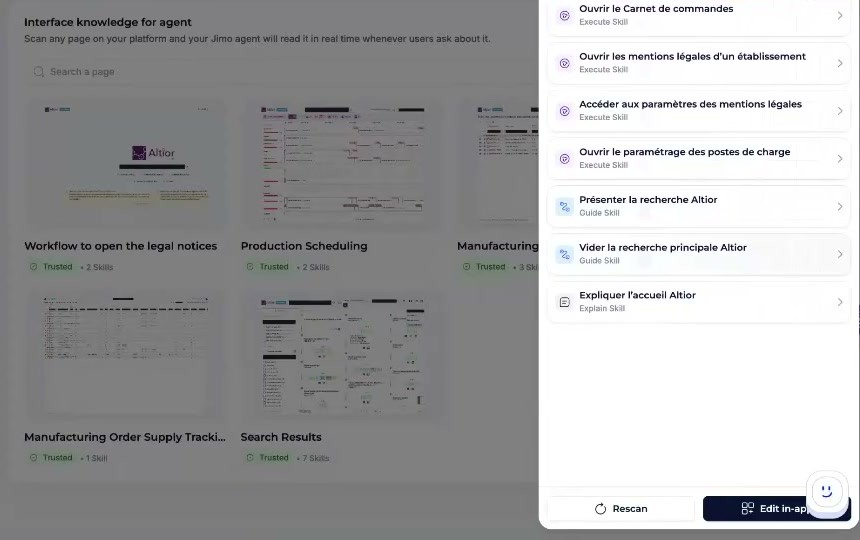
Thomas scanned the two hub pages of the ERP, the home page and the search page, because users always return to them. Most skills live there: open the order book, open the company’s legal notice settings, and so on.
He also found that the agent works faster when each skill describes one precise route. Instead of one skill full of conditions, he creates one skill per starting point. One starts from an open invoice (close the invoice, run the search, open the settings), another starts from the home page. The agent reads the screen, recognizes where the user is, and picks the right skill. Because skills are written in plain language, they are also simpler to build than traditional guides.
3. Tours That Hand Off to the Agent
Thomas noticed that users talk to the agent with keywords rather than full sentences. Asking them to memorize the exact phrase that triggers a skill was not realistic. So he rebuilt one of Altior’s tours as a hybrid:
Intro. The tour opens with a classic welcome step.
Concept. The next step explains the key notion the user needs.
Handoff. A button announces that the agent will now guide them.
Execute. Behind the button, a precise prompt launches the right skill. The user never sees it.
The tour stays short and the agent handles the hands-on part. On its first campaign, it posted the highest completion rate Altior has seen on a tour.
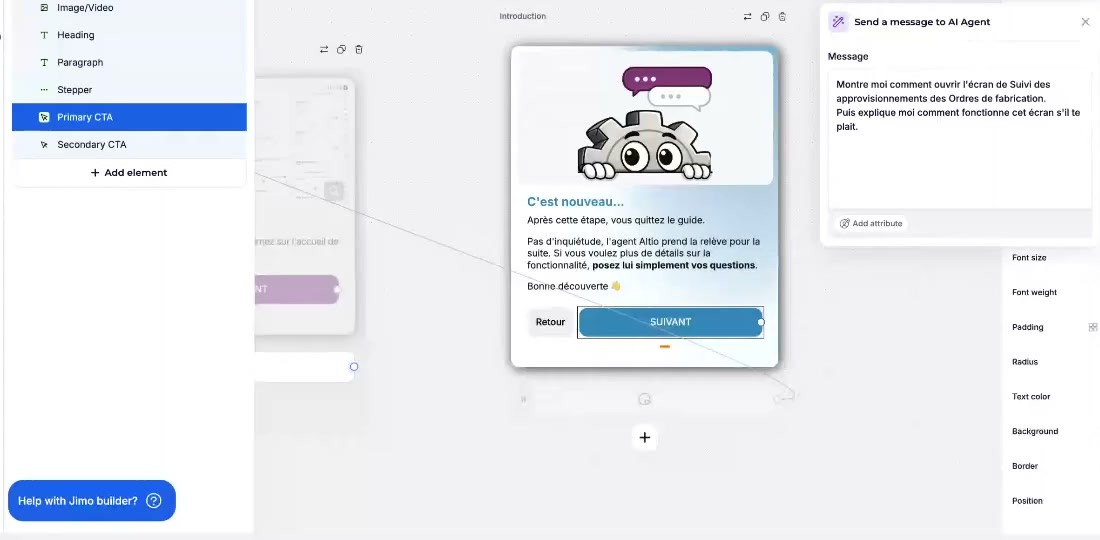
“From the user’s point of view, they clicked Next and the AI took over, because it understood what we were doing just before. It looks really smart. We’ve never had a completion rate that high.”
— Thomas Devaux-Lequint
4. Instant Answers, and a Window into How Users Think
On the sandbox, customers quickly got used to asking the agent questions. Thomas treats those conversations as valuable data: they show what users expect and how they phrase their needs. The keyword-style questions led him to write a short guide that teaches customers how to talk to an AI assistant.
The agent also gave Altior something it had never offered before: an immediate answer to a question, inside the product. Some customers who moved from the sandbox to production asked for it back. The agent made mistakes early on, and adding custom answers based on what customers actually asked smoothed it out quickly.
“The agent created something that didn’t exist before: instant answers. Some customers told me that in production they no longer had the search in the Resource Center, and that it would be great to have it, because being able to ask a question and get an answer was really good.”
— Thomas Devaux-Lequint
5. Training Content That Maintains Itself
Skills read the screen in real time when they run, so there is no snapshot of the interface to keep up to date. When Altior moved the workstation setting into the settings area, the skills adapted right away: 0 screenshots to retake after a UI change.
Setup did not feel like a burden either. From his first test, Thomas could see how much time the agent would save on training.
“I don’t need to take screenshots anymore, because the skill reads the screen by itself. That’s going to save me an extraordinary amount of rework time.”
— Thomas Devaux-Lequint
The Results
Tour completion rate (tour + agent handoff): highest Altior has recorded
People needed to run training and documentation: 1 going forward, previously several
Screenshots to maintain after UI changes: 0
Agent requests per month (sandbox only): about 200–300
Most-praised guidance format: Execute skills
Support ticket quality: more qualified, more advanced
Instant in-product answers: new, did not exist before
The Value: Better Tickets and a One-Person Training Team
Altior already had help tooling, so Thomas did not see a clear drop in recurring questions. What changed is the tickets themselves. Young business owners and project managers at Altior’s customers adopted the agent quickly and use it to dig further into the product. By the time they contact support, they have covered the basics with the agent and read the documentation it pointed them to. They ask about features released two weeks earlier and suggest improvements.
“The tickets we receive now are better quality, much more qualified, thanks to the agent. We’re no longer there to teach a curriculum. They challenge us, and that tells us a real need is starting to emerge.”
— Thomas Devaux-Lequint
The agent also changed how much work training takes on Altior’s side.
“I used to need my project manager colleagues for all of this training. With these tools, one position will be enough. I’ll be able to manage everything on my own.”
— Thomas Devaux-Lequint, Training & Documentation Lead at Altior
“For me, this is the next-generation guide. Ideally, guides should always have worked like this.”
— Thomas Devaux-Lequint, Training & Documentation Lead at Altior
Looking Ahead
Thomas plans to bring the agent to all of Altior’s production users, roughly twice as many people as on the training sandbox. He also wants to roll out the Jimo launcher. Because it knows which screen the user is on, someone could ask “show me the quote” and the skill would skip the search entirely and go straight to presenting the screen.
Why Thomas Recommends Jimo’s AI Agent
Start from your docs. “If you have a good knowledge base with a blog, you already have everything: the brain, all the knowledge the agent needs.”
Ahead of other chatbots. “We had tested Zendesk’s chatbot. You’re light-years ahead of what Zendesk does.”
No developer needed. “I want to stay autonomous on setting up training. I shouldn’t need a developer for that.”
Try it yourself. “You have to get your hands dirty and try it. That’s how you’ll see it.”
Altior replaced screenshot-based guides with AI skills that drive the ERP for users, read the screen in real time, and will let one person run all training and documentation.