/
7 mins read

TL;DR
A feature launch checklist usually lives with one person, and that's the actual failure mode, not a missing step, but a missing owner. When PM, PMM, and CS each work from their own version of "the plan," sales enablement ships on one timeline, the in-product element ships on another, and the accounts most likely to care find out by accident or not at all. This article covers a launch checklist built around coordination, who owns each step and when it has to hand off to the next team, not just a list of tasks. Jimo's checklist, banner, and tour features map directly to the in-product steps once that ownership is actually clear.
A feature launches. The sales deck goes out, the release note gets published, an email goes to the list. Three weeks later, adoption data shows existing users still haven't found it, not because the feature was weak, but because nothing in the launch checklist actually verified they would see it. This article covers the checklist that closes that gap, and where most launch checklists quietly leave it open.
Why Most Product Launch Checklists Miss Existing Users
A launch checklist usually lives with one person, and that's the problem.
It lives with PM, and other teams work off a different timeline
When the checklist sits with Product, sales enablement and messaging often happen on a track nobody's actively checking against the product timeline. PMM finishes the deck a week early or a week late, and nobody notices until launch day exposes the gap.
It lives with PMM, and the in-product element ships late or not at all
When the checklist sits with Marketing, the in-product mechanism, the checklist, banner, or tour that Product was supposed to build, sometimes ships after the external announcement already went out, or doesn't ship at all because nobody outside Product was tracking whether it was actually built, only that it was planned.
CS isn't in the loop, and the accounts that matter most aren't either
When Customer Success isn't part of the launch checklist at all, the accounts most likely to care about a given feature, the ones who already asked for something close to it, find out the same generic way as every other account, through a banner or an email, or don't find out until a support ticket comes in asking why something changed.
The result: a checklist that looks complete and still fails
Every box on the checklist gets checked, from each team's own perspective. Nobody's checklist was actually wrong. Nobody's checklist covered the handoffs between the other two.
Search "product launch checklist" and the results converge on the same list: positioning, messaging, sales enablement, PR outreach, launch-day email. All genuinely necessary. All aimed at the same blind spot.
The Feature Launch Checklist, Pre-Launch Through Post-Launch
A complete checklist spans three phases, and each phase needs an owner and a handoff, not just a list of tasks.
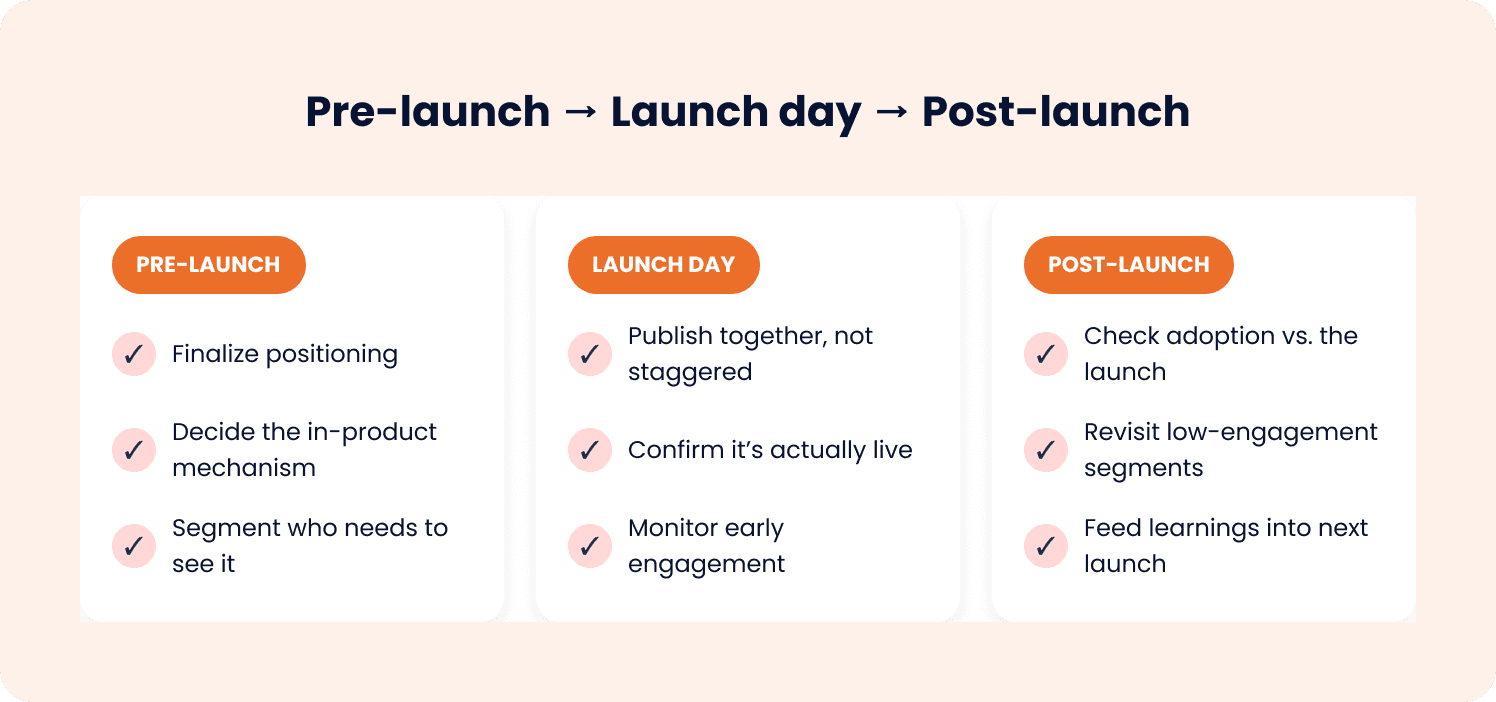
Pre-launch
Finalize positioning and messaging. Owned by PMM, shared with PM and CS before it's final, not after, so both have a chance to flag anything that doesn't match what they're hearing from users or accounts.
Prepare sales enablement materials. Owned by PMM, timed against the same launch date PM is building toward.
Draft the external announcement. Release note, launch email, and any PR outreach. See our guide on writing release notes for that specific artifact.
Decide the in-product mechanism, and who's building it. A checklist, banner, or tour needs an owner and a deadline inside the same pre-launch timeline as everything else.
Flag key accounts to CS. Accounts where this feature addresses something already raised deserve more than a generic broadcast; CS needs this information before launch day.
Launch day
Publish external and in-product elements together, on a timeline all three teams confirmed in advance. A release note going out before the in-product element is live means early readers hit a feature that isn't actually surfaced yet.
Confirm the in-product element is live, not just built, and confirm whoever owns that check isn't assuming someone else already did.
CS reaches out directly to flagged accounts, on the same day, not whenever it fits into an unrelated check-in.
Post-launch
Check adoption data against the launch, owned jointly by PM and CS, since usage numbers alone don't explain why an account isn't adopting something, CS conversations often do.
Revisit segments and accounts that show low engagement. A different mechanism, or a direct conversation, might be needed, not just a repeat of the same broadcast.
Document what worked and what didn't, across all three teams, feeding directly into the next launch's pre-launch checklist. This is what makes the checklist repeatable rather than reinvented, and rebuilt from scratch by whichever team happens to own it that quarter.
Mapping Launch Steps to In-Product Mechanisms
Once ownership of the in-product step is clear, the next decision is which mechanism actually fits.
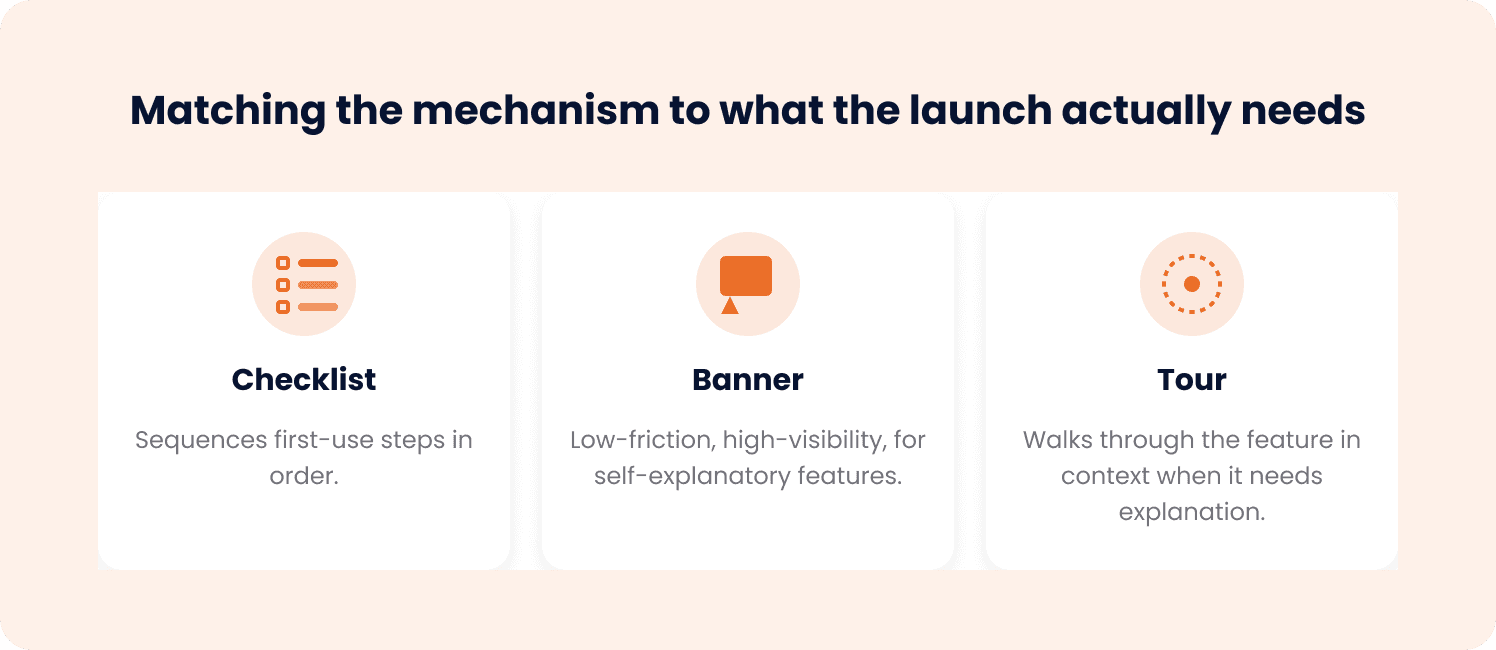
Three tools serve three different jobs, and matching the wrong one to a launch is almost as common as skipping this step entirely.
Launch need | Mechanism | Why it fits |
Users need to be walked through first use, step by step | Sequences the setup or first-use steps in order, so a user completing a new workflow isn't guessing what comes next | |
A broad audience needs to know something changed, with minimal explanation required | Low-friction, high-visibility, appropriate when the feature is self-explanatory once someone knows it exists | |
The feature needs context or explanation before a user can use it confidently | Walks through the feature directly in context, appropriate when a banner alone would leave the user unsure what to actually do |
A Launch Readiness Checklist Template
Field | What to confirm | Owner |
Positioning and messaging finalized | Agreed and shared across PM and CS before final | PMM |
Sales enablement ready | Distributed on the shared launch timeline | PMM |
External announcement drafted | Release note, email, PR scheduled | PMM/PM |
In-product mechanism selected and assigned | Checklist, banner, or tour chosen, with a named builder and deadline | PM |
Key accounts flagged for direct outreach | CS has the list before launch day, not after | CS |
In-product element built and confirmed live | Not just planned, actually checked | PM |
Launch-day timing confirmed across all three teams | External and in-product elements scheduled together | PM/PMM/CS |
CS outreach completed | Flagged accounts contacted on launch day | CS |
Adoption checked against launch | Reviewed jointly, not just from usage data | PM/CS |
Learnings documented for the next launch | Captured from all three teams, not just one | PM/PMM/CS |
What Changes When One Team Isn't Guessing What the Other Two Are Doing
A launch checklist that assigns an owner to every step, and a handoff to every step that touches another team, replaces a checklist that looks complete from inside any one team's view and still leaves gaps between them.
Jimo's checklist, banner, and tour features map directly to the in-product steps once ownership is clear: a checklist walks a segment through first use, a banner announces broadly, a tour explains what needs context, built by whoever owns that step on the timeline everyone already agreed to.
Give the Launch a Single Owner Across Teams
"Steps get missed and adoption is inconsistent launch to launch." That happens when a launch checklist lives in one person's head, or in a doc only their own team opens, rather than in a shared process with a named owner and a confirmed handoff for every step that crosses a team boundary.
For a PM or PMM shipping features regularly, that coordination is the actual fix, not another task added to an already-long list, but clarity about who owns what and when the baton passes. A checklist that covers every team's tasks and never confirms the handoffs between them looks complete and still leaves gaps exactly where launches tend to fail.
See how Jimo's checklist, banner, and tour features map directly to each step of a coordinated launch. Book a demo to see it working against your own launch process.
FAQs
What should be on a product launch checklist?
Beyond the standard positioning, sales enablement, and external announcement steps, a complete checklist includes deciding which in-product mechanism (checklist, banner, or tour) will surface the feature to existing users, defining who should see it, and confirming adoption data afterward, not just that the announcement went out. Most checklists stop at the external steps and treat existing-user visibility as a byproduct of an email rather than a planned step.
What's the difference between a launch plan and a launch checklist?
A launch plan is the strategy: positioning, messaging, target audience, timing, and goals for a specific launch. A checklist is the repeatable execution layer underneath it, the specific steps that get verified every time so nothing gets missed regardless of who's running the launch or how many launches have happened before it.
How do you measure launch readiness?
Readiness isn't just whether external materials are drafted, it's whether the in-product element is built, tested, and live, whether target segments and key accounts are defined, and whether a way to check post-launch adoption is already in place before launch day. A launch that's "ready" on the external side but hasn't built or tested the in-product element isn't actually ready.
Why do feature launches underperform even with a checklist?
Most checklists are built around acquisition channels, positioning, PR, sales enablement, and assume existing users will find out through an email. Email reaches only the people who open it, on the day they check, and doesn't segment well by relevance. A checklist can be fully completed and still miss the users most likely to adopt the feature, because the channel that would have reached them in-product was never a planned step.
How do B2B product launches differ from consumer launches?
A B2B launch usually has a smaller, more identifiable existing user base, often organized into accounts with a CS relationship attached, which makes targeted in-product visibility and direct CS outreach to key accounts more viable than in a large consumer base. A consumer launch typically leans harder on broad awareness channels; a B2B launch can and should use account-level knowledge that a consumer team usually doesn't have available to it.