TL;DR
Enterprise SaaS onboarding cycles delay revenue because the same expensive human capacity a board expects to be driving expansion is tied up in routine setup work that doesn't need it. The framework here reclaims that capacity without abandoning the human-assisted motion enterprise deals require. Move the repeatable parts of the SaaS onboarding process to guided self-serve, and redirect the named customer success owner's time to the parts that need a human. Jimo is the AI-native digital adoption platform that lets product teams build that guided self-serve layer in days, so the human relationship stays intact and the routine work stops consuming it.
The instinct in enterprise SaaS onboarding is to list every task your team touches and look for inefficiencies. If you do this, you’ll end up with a detailed map of what people do and no clearer sense of what they should be doing instead.
Some implementation work deserves the attention of a senior employee. A lot of it doesn’t. Most of the delay in enterprise implementation comes from work that doesn't need a person but still gets one anyway. That’s the same time the board expects to see going toward expansion instead.
The sections below walk through which parts of implementation genuinely need a human, which ones don’t, and how to move the routine work off expensive capacity without losing the relationship enterprise accounts warrant.
The real cost of long enterprise implementation cycles
The bottleneck in enterprise SaaS onboarding is a capacity-allocation problem that the VP owns. Routine setup work and complex implementation work share the same expensive human capacity. Right now most of that capacity is going to the wrong area of onboarding.
Misallocated capacity
According to an Autonomi Express report, 68% of customer success time goes to low-value, repetitive tasks instead of strategic customer guidance. The same report found that 70% of setup tasks are identical across customers despite every implementation being treated as unique.
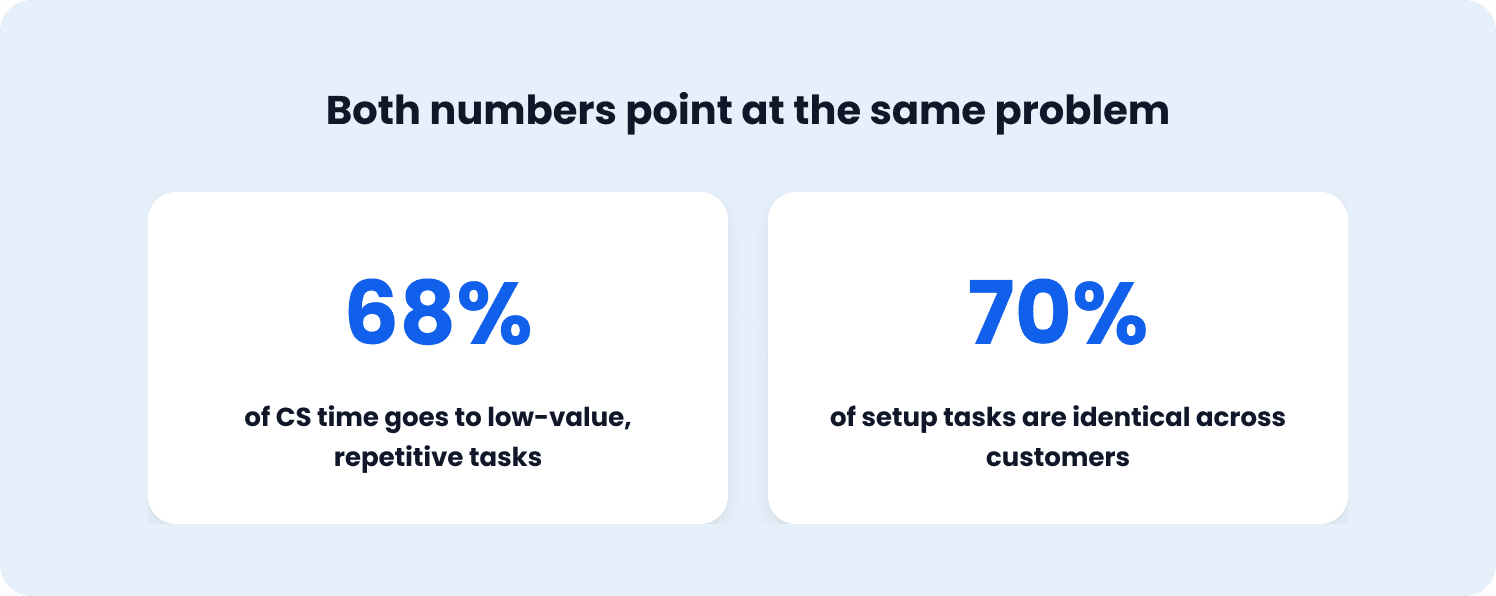
Customer success managers (CSMs) are wasting their time on repeatable work. Repetitive setup tasks are exactly what self-serve onboarding should handle, customized by segment. A human touch is necessary, but not at every single stage, and especially not for low-value tasks that don’t require strategic input.
The State of Customer Onboarding 2025 also found that 46.4% of onboarding teams deal with resource bandwidth issues, with little time left for tailored onboarding or strategic planning.
When implementation drags, customer churn risk rises. Bogging down enterprise clients in configuration and needless conversations delays their time to that first “aha” moment that gives the product value. Customer retention in enterprise SaaS depends on reaching that first value milestone quickly. When the customer success team is buried in routine setup, the accounts that need strategic attention don’t get it.
Why the human-assisted model isn’t the problem
Despite the need for more automation and self-serve options during onboarding, a human’s presence is still absolutely necessary. Only 1% of leaders say CS support is unnecessary for a new account to fully adopt the product. And 45% reported that their customers require some CS support and training sessions to get each user acquainted. So the work needs a human, almost everyone agrees on that, but most of what that human does right now is only somewhat automated. And a large share of it is low-value repetition.
Enterprise onboarding is a fully manual, human-owned model by design. People still need to be part of the process. The issue to solve is whether routine setup work should be consuming their hours, or whether those hours should go to the parts of implementation that require human judgment.
Right now, the repetitive and strategic categories of work compete for the same capacity, and the routine work wins by volume. The complex work wins by urgency, which means the routine work gets done hastily between the urgent moments, or it gets deferred, or it quietly extends the onboarding journey. Either way, the cycle stretches.
How this plays out in a real deal
Consider what happens when an enterprise account sits in the implementation queue. The customer’s enthusiasm is highest at close. Every week that passes without meaningful progress erodes that momentum, and the customer’s internal champions start to look slow in front of their own stakeholders. The CSM assigned to the account is juggling four other implementations, each with its own routine setup work, so the non-urgent tasks slide.
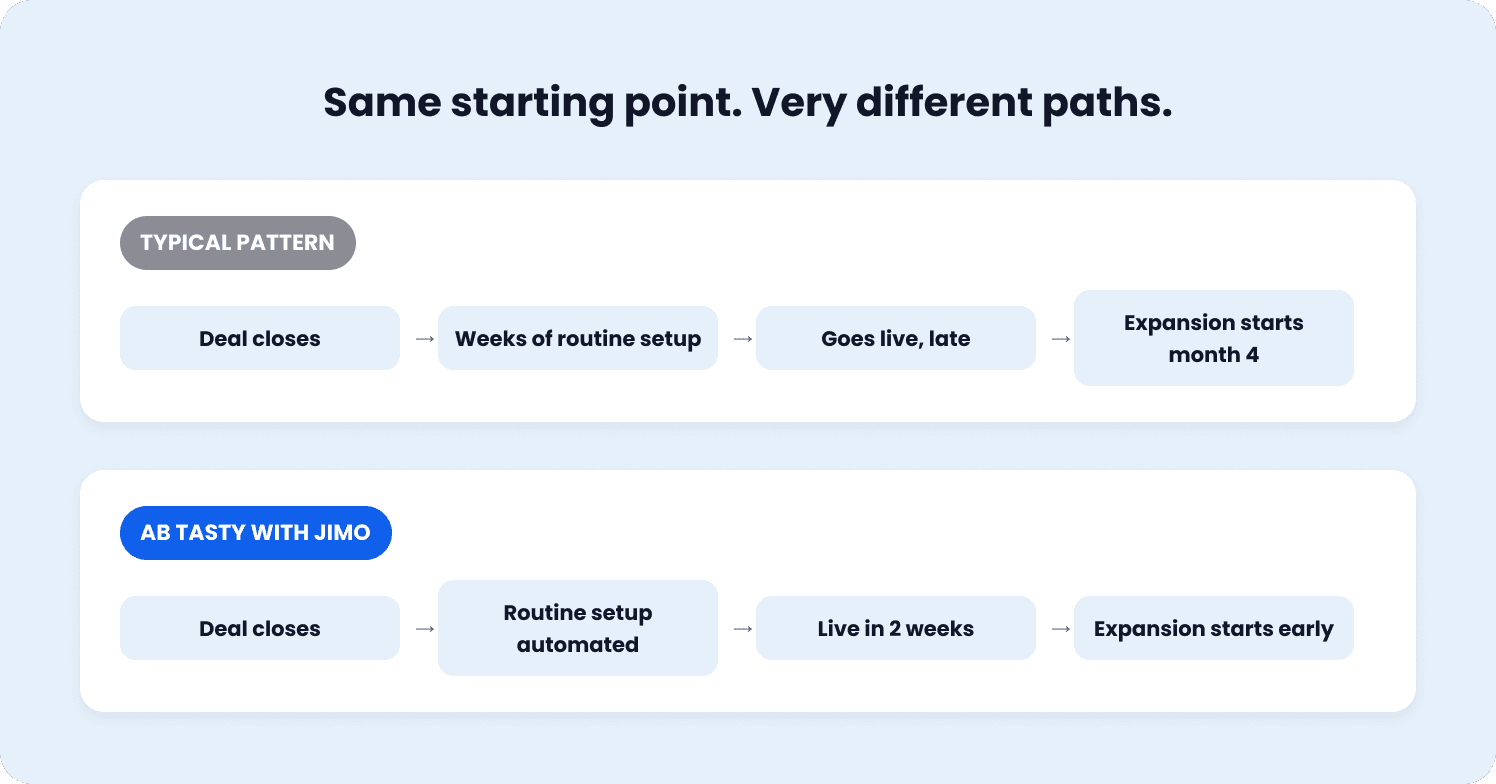
The account goes live eventually, but later than the close-date energy suggested it would. By the time it does, the expansion conversation that should have started in month two is starting in month four. The board sees the delay as a pattern of enterprise customers taking longer than the model assumed to reach the revenue stage that justified the deal.
Where enterprise implementation capacity actually needs to go
Don’t start with a task audit. Start with asking resourcing questions: Which parts of enterprise implementation honestly require your team’s most expensive capacity, and which parts are consuming it without needing it?
The work that genuinely needs a human
The human parts are easy to identify. Multi-stakeholder coordination (like aligning IT, security, finance, and line-of-business owners on a rollout plan) isn’t something a walkthrough can do. Security review, where a customer’s compliance team needs to interrogate your data handling, also requires a conversation, not a checklist. Custom configuration that touches the customer’s specific data model or integrates with their existing stack requires someone who understands both systems.
Enterprise rollouts run into organizational resistance, and easing that resistance takes someone who can read the room and adjust the approach in real time. These are the moments where a named CS owner or sales engineer earns their cost, and these are the moments that define whether the customer onboarding experience feels high-touch or transactional.
The work that doesn't
The parts that don’t need that capacity are just as easy to name:
Initial workspace structuring
User provisioning and role assignment
Technical setup of standard integrations
Walking a new admin through where the settings live
Configuring notification preferences
These are the tasks the Autonomi data identifies as identical across 70% of implementations. They follow the same steps, in roughly the same order, for every enterprise user. They require completion instead of judgement. And right now, they’re being completed by people whose judgment is the most expensive thing about them.
This is where user personas matter. Routine setup work looks different depending on who’s doing it. Is it an admin setting up permissions, a team lead configuring workflows, or a new hire completing their first action? But within each persona, the steps are predictable. That predictability is exactly what makes personalized onboarding through guided self-serve viable. The guidance adapts to the persona, but the underlying work doesn’t need a human to execute it.
The reframing that changes what you optimize for
If you’re approaching enterprise onboarding simply as a queue to clear, you’re optimizing for speed. That approach means you’ll feel compelled to add more capacity and coordination. And that’s how you end up with more costly hires, more parallel tracks that should’ve been personalized paths, and more unnecessary project management.
If you treat enterprise onboarding as a capacity-allocation decision, you can then optimize for fit. Does this specific onboarding task require this specific person’s judgment, or could a guided experience handle it while the person focuses on the account's actual complexity? The first approach scales linearly with headcount. The second scales with the proportion of work you successfully move off expensive capacity.
When 70% of setup tasks are identical across customers, it’s easy to transition plenty of steps to self-service. A structured onboarding workflow built once can run for dozens of accounts at the same time, without a human repeating the same steps on each call. The work that remains for the human owner is the work that actually needs them, and because that work is a smaller share of the total, the same headcount can serve more accounts without the quality dropping.
Your capacity doesn’t have to increase, it just needs to get reallocated. Then, the cycle compresses because fewer expensive hours are spent on work that never required them.
What it takes to reclaim that capacity without losing the enterprise relationship
If you want to properly reallocate capacity, the solution is guided self-serve, in-product experiences that handle the routine parts of implementation without a human on the call. Understanding what makes it work (and why the older generation of tools are becoming outdated) is what determines whether you can solve your capacity problem.
Why static tours don’t move capacity
The older approach, static digital adoption platforms (DAPs) and linear product tours, doesn’t move capacity because users skip them. Static linear tours average around 27% completion. AI-powered adaptive tours reach closer to 44%, according to Jimo’s own analysis of product tour performance.
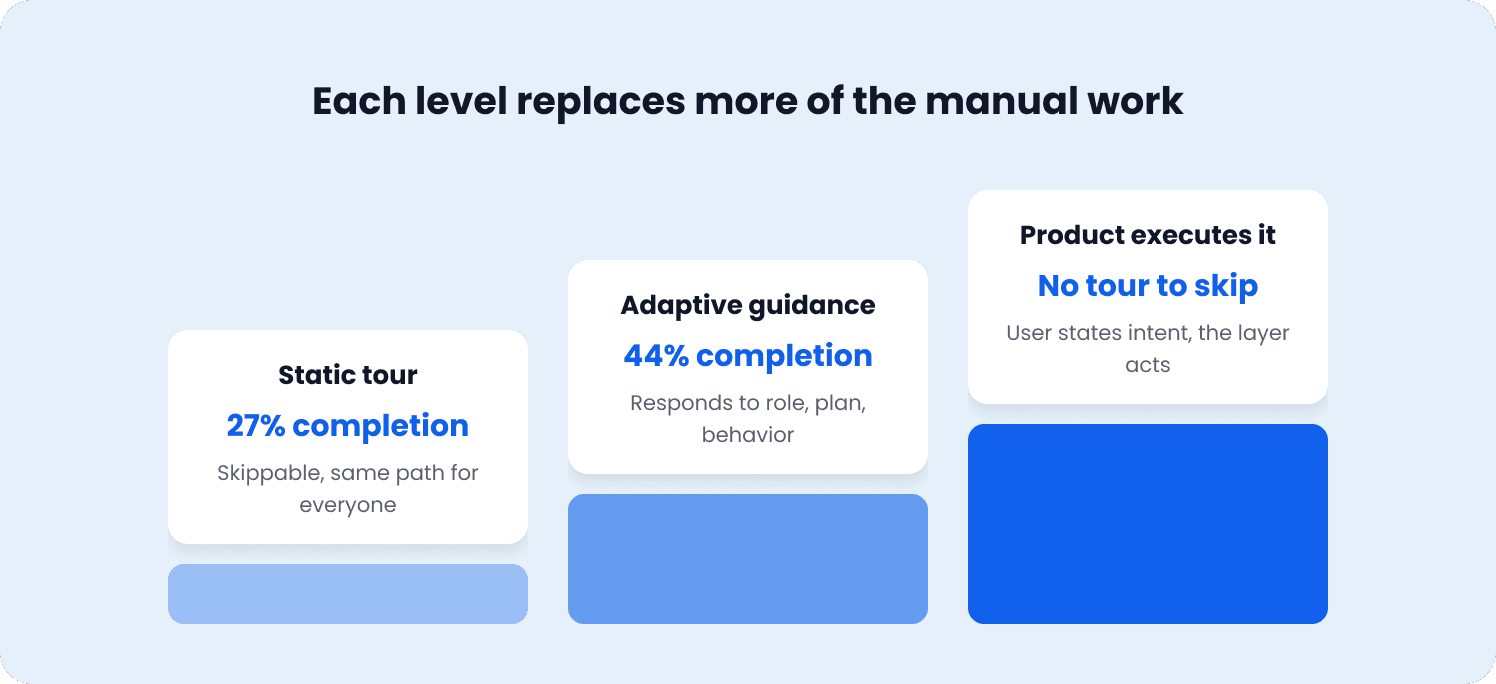
Every percentage point of onboarding completion is one fewer account that ends up back on a CS call asking the question the tour was supposed to answer. A guided experience that users abandon is just a more expensive version of the problem it was meant to solve. You’ve built the self-serve layer, but the work still lands on the human because no one finished the walkthrough.
What adaptive guidance actually does
Adaptivity separates guided self-serve that works from guided self-serve that gets skipped. The routine parts of enterprise implementation aren’t identical in sequence. They vary by role, by plan, by the customer's existing configuration. A static tour shows every user the same path regardless of context, which means it's wrong for most of them.
Guiding users through contextual onboarding that responds to what they’re actually doing is how you reach activation. Adaptive guidance walks an admin through workspace setup differently than it walks an end user through their first action, and it adjusts based on user behavior in the product instead of following a script.
The same logic applies to the questions that fill a CSM's inbox during implementation. Low-stakes interruptions like “Where is this setting?” or “How do I invite a teammate?” take from capacity without adding value. Context-aware answers, trained on the product's own knowledge base and delivered through in-app messaging, can help new users without leaving the app and without opening a ticket.
Users navigate the product on their own, find what they need in context, and the CSM’s inbox stays clear. This is how you reclaim capacity. It’s one of the most direct ways SaaS companies can reduce customer support tickets without degrading the support experience.
When the product does the work, not just the guidance
There’s a further category of routine work that goes beyond answering questions. When a user can describe what they want (like “set up my team's permissions for the Q4 review”) and the guided layer handles the steps, the routine work stops being something a human walks through on a call and starts being something the SaaS platform does on the users’ behalf.
The result is a seamless onboarding experience for the enterprise user, one where routine setup happens without friction, without a support ticket, and without a scheduled call. That’s what a good user onboarding experience looks like at enterprise scale. It’s a smarter division of labor between the product and the person, with a shorter human interaction. When SaaS software handles the predictable work, the user onboarding experience stops being a bottleneck and turns into a smooth onboarding that gets accounts to value faster.
Why implementation cycle time is a board-relevant number, not just an operational one
Slow implementation tests a customer's patience and starts the relationship on the wrong tone. It also delays the point at which an enterprise account starts generating the expansion revenue that justified its annual contract value (ACV) in the first place. Revenue lands later, and under ASC 606, the accounting framework that governs how SaaS companies recognize revenue, implementation periods can defer recognition until service delivery begins. The revenue isn't lost, but the timing shifts, and the cash-flow impact is immediate.
The downstream effect is what makes this a board conversation, and a CS-team conversation second. Capacity spent on routine setup is capacity a board would rather see driving new deals or account growth. When 70% of CS time goes to low-value repetitive tasks, that’s 70% of an expensive team not doing the strategic work the board approved the headcount for.
The number that lands in a board meeting is how much expansion revenue this account is generating, and how soon. The framework for turning onboarding decisions into measurable outcomes is covered in our SaaS onboarding strategy piece, and the board-reportable metrics a VP can defend in a meeting are laid out in our product-led growth metrics guide.
When the routine parts of enterprise implementation move into guided self-serve, the account reaches its activation milestone faster, the human owner’s capacity goes to the work that needs it, and the cycle time that was quietly deferring expansion revenue starts to compress.
What changes when a VP of Product owns implementation cycle time
The VPs of Product who treat enterprise SaaS onboarding cycle time as something they own, and the CS team manages second, are the ones whose enterprise accounts start generating expansion revenue sooner.
AB Tasty, from three months to two weeks
AB Tasty, a SaaS A/B testing platform serving 4,000 active users, compressed their onboarding timeline from three-plus months to two weeks after moving routine setup to Jimo.
“We were really dependent on development,” said Morgane at AB Tasty. “All this stuff about onboarding tools, CSAT, product tools, it was at the end of the chain and sometimes it was skipped, unfortunately.”
Creation time dropped to 1.5 hours, with full team adoption in a week. Engineering stayed on core product, and the onboarding cycle collapsed. That’s effective user onboarding at scale, and why SaaS user onboarding can mean something other than fully manual or fully automated.
The move for VPs of Product
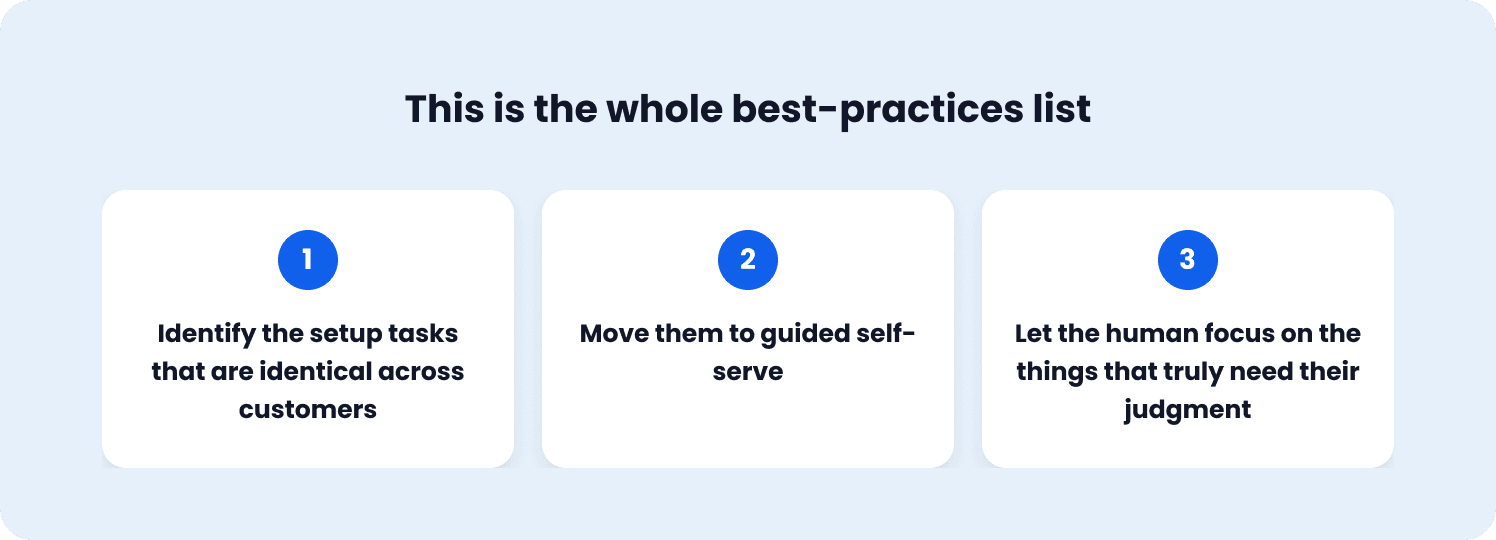
For enterprise clientele and the teams serving them, the takeaway is that effective SaaS customer onboarding at enterprise scale is about removing the routine work to make space for human value. The best practices for onboarding enterprise users in SaaS come down to this:
Identify the setup tasks that are identical across customers.
Move them to guided self-serve.
Let the human focus on the things that truly need their judgment.
For VPs of Product accountable for why enterprise deals take as long as they do to start generating expansion revenue, the move is clear. Start seeing product tours and in-product checklists as capacity-allocation tools that move routine setup off expensive human capacity without removing the human from the account.
Book a demo to see how Jimo shortens enterprise onboarding cycles with guided, self-serve experiences for the routine setup work.
FAQs
Does compressing enterprise onboarding processes put revenue at risk?
No. The opposite. Long implementation cycles push back the moment an account starts generating expansion revenue, and they tie up senior capacity in routine setup that doesn't need it. Compressing the repeatable parts of the onboarding process shortens the path to activation without removing the human from the parts that do require one.
How does implementation cycle time affect enterprise expansion revenue?
Expansion revenue requires a live, value-generating account. The longer implementation drags on, the longer that account waits before it's in a position to expand. A SaaS provider that reaches onboarding milestones quickly sees expansion conversations start sooner, and the capacity freed from routine setup goes toward driving that growth instead of delaying it.
Does self-serve onboarding undermine the enterprise relationship a board expects CS to own?
No. Guided self-serve handles the routine parts of the customer onboarding process (setup, configuration, permissions). The owner still runs the multi-stakeholder kickoff, still handles security review, still manages custom configuration. What changes is what fills their hours. Less routine repetition, more of the strategic work that drives product adoption and customer satisfaction.
How should implementation capacity be allocated across an enterprise onboarding motion?
Send human capacity to the work that requires judgment. Move the routine, repeatable parts to a guided SaaS onboarding checklist or adaptive interactive walkthroughs. The proportion of work that successfully moves off expensive capacity is what compresses cycle time without adding headcount, and it's the core lever behind measuring onboarding success at scale.
What makes an effective SaaS customer onboarding strategy for enterprise accounts?
An effective SaaS onboarding strategy splits implementation work into two categories. The parts that need human judgment stay with a named owner. The routine parts move to guided self-serve so the owner's time goes to user engagement and account growth instead of setup. When SaaS businesses get this split right, the onboarding flow compresses, customer feedback gets more actionable, and the account reaches a positive onboarding experience faster.